Release notes
This topic contains the release notes for the Fall '25 release of Scientific Publications Cloud product. The release notes are organized into these high-level sections:
-
Installation and upgrades -- link to install and/or upgrade to the new version.
-
New features -- new features and functionalities introduced in the new release.
-
Updated features -- existing features and functionalities enhanced in the new release.
-
Hotfixes -- defects identified in the original Fall '25 release that were fixed via hotfix patches.
-
Defect fixes and maintenances -- defects and maintenance items fixed in the new version.
-
Metadata changes -- changes to the underlying data models, user permissions, or system configurations included in the new version.
-
Deprecated and deleted items -- components of the product that have been deprecated, removed, or retired in the new release.
-
Recommended post-upgrade actions -- recommended actions administrators should take after upgrading to the new version.
As this page is maintained and updated over time to ensure accurate and timely information, Mavens recommends referencing the release notes online rather than printing and referencing static versions of the page. The Changelog page lists all notable changes made to this page.
Installation and upgrades
The Scientific Publications Cloud Fall '25 release can be installed with the at https://install.komodohealth.com/products/kpp/latest. New installs of Scientific Publications Cloud will be on the latest release while current customers will need to run and deploy the latest update.
Warning: Remember to complete the steps in the Recommended post-upgrade actions section below as appropriate.
New features
The new release of Scientific Publications Cloud product contains several new features whose functionalities are detailed below. Details about enablement and configuration are included within the product documentation.
Fall'25 Hotfix 2 Mobile-optimized Tasks view
This patch release includes a mobile-optimized Tasks view that provides a streamlined, touch-friendly experience for mobile reviewers and approvers. A new tab Tasks used a card-based design enabling users to review and complete tasks efficiently on mobile devices with minimal navigation.
Related work item(s): MPP-3399
Branding update and enablement of SLDS 2
This past summer, we officially reintroduced ourselves as "Mavens" and renamed Scientific Publications Cloud product to "Scientific Publications Cloud product." To reflect the updated brand and product name, company assets like icons and logos have been updated accordingly and instances of "Pubs," such as in Lightning Web Components, have been replaced with "SPC." Additionally, this new release of the product was tested against Salesforce's new Lightning Design System 2 (SLDS 2), so several components and features have been modified slightly to match the updated design. Customers are encouraged to upgrade to SLDS 2.
Related work item(s): MPP-3175, MPP-3230, PLTFM-3465
New Home page
The Fall '25 release offers a new Home (PP_Home) flexipage that gives
users a single, consolidated view of their work the moment they log into
Scientific Publications Cloud product. It provides users with quick access to their assigned tasks
and documents and shows high-level publication metrics and important
announcements and resources stored in the new Communication
(mvn__CO_Communication__c) object. This Home page eliminates the need
for administrators to manually create or configure landing pages for
their users and improves the overall usability of the product. For
product documentation, reference
Home page.
Related work item(s): MPP-2989, MPP-3207, MPP-3208, MPP-3209, MPP-3210, MPP-3225
New Lightning Web Chart.js Component (LWCC)
Salesforce Labs's Lightning Web Chart.js
Component (LWCC)
has been added to this new release to provide more powerful and flexible
data visualization options across Scientific Publications Cloud product. There is a Chart Builder
(cjChartBuilder) component that can be added on any record page for
general use as well as a ppChartBuilder component that surfaces journal
metrics data and replaces legacy Digital Science charts, as described in
the Updated Digital Science visualizations section below. This enables administrators to embed
charts on record pages to give users richer insights into their
publication data and deliver a smoother, modernized visualization
experience. For product documentation, reference the
Chart Builder component page.
Related work item(s): MPP-3021, MPP-3022, MPP-3110
Mobile app for task reviews and approvals
The Scientific Publications Cloud Fall '25 release introduces a new Salesforce mobile application
called "Scientific Publications Mobile" for users to view documents
and review and approve tasks on the go. This enables internal Scientific Publications Cloud users to
complete their tasks even when they cannot easily access their laptops
or desktops. Along with the release of the mobile app, a new Document
Version URL (mvn__PP_Document_Version_URL__c) field has been added to
the Activity object and to the out-of-the-box Task layouts to help users
more easily navigate from a Task record to the related Document Version
(mvn__CM_Document_Version__c) record and preview any relevant
documents from the Files related list to complete a task. Only Document
(mvn__CM_Document__c), Document Version, and Task records can be
accessed on the mobile app. For more information, reference the
Full App vs. Lite App vs. Mobile App section on the
Get started page.
Note: If you are upgrading to Fall '25 from a previous version of Scientific Publications Cloud product, make sure to complete the steps in the Recommended post-upgrade actions section below to enable users to add the mobile app. The Fall '25 release makes Scientific Publications Mobile fully compatible with the Salesforce Mobile App, which users will need to download on their mobile devices to access Scientific Publications Cloud functionality.
A follow-up update in early 2026 will introduce a custom Scientific Publications Cloud mobile interface designed to optimize navigation, reduce the number of screen taps, and further streamline the mobile user experience.
Related work item(s): MPP-3058
Document relationship visualization
A new Relationship Visualizer component is available in this release to
help users better visualize and understand how a document is related to
other documents. This supplements, and is available from, the existing
Related Documents component to provide an interactive canvas that
displays all of the current document's parent, child, and peer
relationships. In the canvas, every document is a "node," with the
current, or "anchor," document being the central node, and all
parent-child relationships appear as vertical lines and nodes while all
peer/related relationships appear as horizontal lines and nodes. Any
document relationship type can be configured to be a peer or horizontal
relationship via the new Is Peer (mvn__CM_Is_Peer__c) checkbox field
on the Document Relationship Type
(mvn__CM_Document_Relationship_Type__mdt) custom metadata type. Admin
users can also configure the interactivity and appearance of various
aspects of the Relationship Visualizer using the new Relationship
Visualizer Configuration
(mvn__RV_Relationship_Visualizer_Configuration__mdt) custom metadata
type, including how users may pan around and zoom in and out of the
canvas and what information users may see in the canvas. For product
documentation, including more information on how to use and configure
the Relationship Visualizer, reference the
Relationships page.
Related work item(s): MPP-3201, MPP-3202, MPP-3203, MPP-3204, MPP-3205, MPP-3206, MPP-3224, MPP-3240, MPP-3241, MPP-3242, MPP-3245
Rich text fields for documents
A new Content (rich text) (mvn__CM_Content_Rich_Text__c) field is
available on the Document Version (mvn__CM_Document_Version__c) object
to enable users to add formatted content to documents. For documents
without files, this rich text content can appear in place of the file in
document previews. This is automatically enabled for new installs of the Scientific Publications Cloud
product and can be manually enabled for upgrades when the Content (rich
text) field is added to document preview layouts.
Content inside rich text fields is included in document searches, and all rich text fields support merge fields. Additionally, rich text fields now allow users to embed publicly available images that are either hosted in a Salesforce org and shared with a link or hosted on an external website; to ensure that images are properly included in emails, users should either insert the URL of the image or copy the image from the public location (e.g., right click on the image and select Copy) and then paste the image into the rich text field (e.g., right click in the field and select Paste).
Note: If you are upgrading to Fall '25 from a previous version of Scientific Publications Cloud product, make sure to complete the steps in the Recommended post-upgrade actions section below to enable the new rich text field in document preview and edit layouts.
Related work item(s): MIC-4123, MIC-4124, MIC-4127, MIC-4130, MIC-4145, MIC-4150, MIC-4190
Updated features
The new release of Scientific Publications Cloud product also contains several improvements and optimizations to existing features and functionalities to better align with customer feedback and provide an enhanced user experience. Unless noted otherwise, all updated features are shipped "off" by default for existing customers and "on" by default for new customers.
Updated Digital Science visualizations
Along with Salesforce Labs's Chart Builder (cjChartBuilder)
component, as described in the New Lightning Web Chart.js Component (LWCC) section above, Scientific Publications Cloud's
custom ppChartBuilder component is also introduced in this new release.
While the Chart Builder component can be used to display any type of
data on any record page, the ppChartBuilder component is built
specifically for journal metrics data and is intended to replace
existing Digital Science charts with Chart.js visualizations. This
update polishes and enhances the user interface and user experience
(UI/UX) of the Digital Science integration, such as by providing more
informative x and y axes and enabling greater configuration of Digital
Science visualizations. The existing charts that have been replaced
include those in the ppdsJournalMetricsWrapper component on the default
Digital Science Journal Record Page
(PP_Digital_Science_Journal_Record_Page) as well as those on the
journal comparison screen of the Document Target Search and Proposed
Target Search modals. To configure the visualizations on Journal record
pages, admins can open the ppChartBuilder component in the Lightning App
Builder and select amongst different chart options, set custom chart
titles, and more; to configure the visualizations in the journal
comparison screens, admins can select the desired chart type on the new
Chart Type (mvn__PP_Chart_Type__c) field on the Journal Metrics
Configuration (mvn__PP_Journal_Metrics_Configuration__mdt) custom
metadata type. For product documentation, reference the
Digital Science page.
Warning: The new ppChartBuilder component is available for all customers by default. However, if you are upgrading from a previous Scientific Publications Cloud version to the Fall '25 release, you must use the to install the unpackaged metadata for the updated visualizations on the Digital Science Journal Record Page and the journal comparison screen in the Document Target Search and Proposed Target Search modals.
Related work item(s): MPP-3021, MPP-3022, MPP-3110
Enhanced Document Collaborator component
The existing SPC - Related Document Authors (ppRelatedDocumentAuthors)
Lightning component, also referred to as the Document Collaborators
component, has been enhanced with more features and greater usability.
For example, users are now able to expand on each row in the component
to view all of the activities and communications related to a specific
document collaborator as well as resend welcome emails and user
verification emails and reset passwords for Collaborator Portal users.
Related work item(s): MPP-3072, MPP-3074, MPP-3075, MPP-3166, MPP-3167, MPP-3228, PLTFM-3472, PLTFM-3487, PLTFM-3515
Related activities and communications
If the new Enable Expanded Doc Collaborator List
(mvn__PP_Enable_Expanded_Doc_Collaborator_List__c) field on the
Default (PP_Default) Pubs Global Setting
(mvn__PP_Global_Setting__mdt) custom metadata type is checked (i.e.,
set to true), each row in the Document Collaborators table can be
expanded to show an Activities table and a Communications table. The
Activities table lists all of the Activity and Task records assigned to
the selected document collaborator for the current document while the
Communications table lists all of the Notification Log
(mvn__SE_Notification_Log__c) records where the document collaborator
received an email or notification related to the current document. The
Notification Log object is a new object in this release that tracks
every email and Salesforce notification that is sent to a document
collaborator, such as when a workflow task is assigned or when a welcome
email, user verification email, or password reset email is sent to a
Collaborator Portal user. There is also a new Notification Log Service
(SE_NotificationLogService) global Apex class that can
programmatically create Notification Log records for any custom emails,
such as for activities that are not native to Scientific Publications Cloud product.
The Communications table is also available on the Contact Record Page
(Contact_Record_Page) by default to list all emails and notifications
sent to the contact irrespective of the document and can be added to
other Contact record pages via the new MVN - User Communication History
(seCommunicationHistory) Lightning component.
Warning: The Communications table on both the Document Collaborator component and the Contact record pages only contains email and notification logs from the Fall '25 release and beyond. It does not retroactively retrieve and display all of the emails and notifications that have been sent out prior to this Fall '25 release. If you would like the Communications table to be populated with any older emails or notifications, please reach out to the Customer Support team.
For more information, reference the View related activities and communications section on the Document Collaborators page and the View communication history section on the Collaborator Portal page.
Option to resend Collaborator Portal emails
Every row in the Document Collaborators table for a contact (i.e., a Collaborator Portal user) has additional options in the dropdown menu for users to resend welcome emails, user verification emails, and password reset emails. This update streamlines the process for existing Collaborator Users to switch to passwordless login. Any additional email that is sent is tracked in a separate Notification Log record.
For more information, reference the View related activities and communications section on the Document Collaborators page and the View communication history section on the Collaborator Portal page.
Annotate files with the enhanced document viewer
Users can now provide annotations on Word and PDF files when previewing
documents with the enhanced document viewer. To enable the new
annotating functionality, admin users must first activate the File
Annotations (WV_File_Annotations) Feature Activation
(mvn__Feature_Activation__mdt) metadata record and then create a
custom Document State Role Permission
(mvn__CM_Document_State_Role_Permission__mdt) metadata record that
looks up to the new Annotate (CM_Annotate) Permission
(mvn__CM_Permission__mdt) metadata record. Users without the
appropriate permission will only be able to view annotations.
Additionally, annotations are not supported for video files, package
files, or files that are part of a bundle package. All annotations will
be stored in the new File Marker (mvn__WV_File_Marker__b) big object.
For product documentation, reference
Enhanced document viewer.
Related work item(s): PLTFM-3429
Hotfixes
The table below details defects identified in Scientific Publications Cloud Fall '25 that were fixed via a hotfix patch. You may click the links in the Hotfix/patch version column to install the hotfix with the Install Service.
Hotfix items
| Work item | Description | Fix/new behavior | Hotfix/patch version |
|---|---|---|---|
| MPP-3693 | When a Publications Standard User without the Assign Permission Sets permission clicked on Resend Welcome Email/ Reset Password for a Collaborator Portal user, the welcome email/ reset password email was not sent to the user. | When a user without the Assign Permission Sets permission clicks on Resend Welcome Email/ Reset Password for a Collaborator Portal user, the system adds a User Request (mvn__PP_User_Request__c) record to a queue. A background process later picks up that queue and sends the welcome email/ reset password email. Note: An administrator is required to configure the required upgrade steps after installing the patch. | Fall '25 hotfix (3.6.0.93) |
| PLTFM-3594 | When users checked in a document, if an error occurred (other than the document being locked), they saw an infinite loading spinner instead of an error message. | During document check-in, if an error occurs, the spinner stops and users see an error message. | Fall '25 Hotfix (3.5.0.136) |
| MPP-3326 | When a user canceled the last remaining task in a Workflow (mvn__CM_Workflow__mdt), the Workflow Instance (mvn__CM_Workflow_Instance__c) remained in "Pending" Status. The system didn't trigger the transition criteria to update the Workflow Instance to "Complete" and the next Workflow in the Document Lifecycle (mvn__CM_Document_Lifecycle__mdt) never started. | When a user cancels the final task in a workflow, the Workflow Instance (mvn__CM_Workflow_Instance__c) no longer remains in "Pending" status. The Workflow Instance now transitions to the next Workflow (mvn__CM_Workflow__mdt) instead of waiting indefinitely. | Fall '25 Hotfix (3.5.0.136) |
| MPP-3250 | On Plan Team Member, two competing processes used to erroneously reset Processing Result field to "Pending" causing records to be reset to "Pending" on every update and preventing them from ever being removed from the queue. | On Plan Team Member, routine updates no longer reset a record's Processing Result status. Processing Result is now set to "Pending" only when the Existing Role value actually changes. | Fall '25 Hotfix (3.5.0.136) |
| MPP-3384 | The Welcome email sent to new users during provisioning did not verify the user's email address because it did not include a link to the portal. In addition, the Resend Welcome Email button was not working. | The Welcome email now directs users to the Set Password page, allowing them to verify their email address. In addition, the Resend Welcome Email button now works correctly. Note: While upgrading, edit the Forgot_Password_VF Email Template and update PP_Forgot_Password_Email_Button_Text to mvn__PP_Forgot_Password_Email_Button_Text and PP_Email_Footer to mvn__PP_Email_Footer. | Fall '25 Hotfix (3.5.0.136) |
| MPP-3164 | In the Collaborator Portal, on the Active Publications tab, sorting was not working on the STATUS column for external portal users. | Sorting is working correctly on the STATUS column for external portal users. | Fall '25 Hotfix (3.5.0.136) |
Defect fixes and maintenance
The table below details defects and maintenance items identified in Scientific Publications Cloud Spring '25 that have been fixed in Scientific Publications Cloud Fall '25.
Note: If you are upgrading the Collaborator Portal from a previous version, make sure to complete the steps in the Recommended post-upgrade actions section below.
Fixed items
| Work item(s) | Description | New behavior |
|---|---|---|
| MPP-3002 | When an external document collaborator was assigned a task for a document that they did not have access to and the user tried to open the document in the Collaborator Portal, they received the following error message: NOT_FOUND: record id not found | The error message has been updated to be more contextual and user-friendly so that external document collaborators can better understand why they may not be able to open a document for a given task. If the sync service is pending or running such that the Pending Sharing Update (mvn__CM_Pending_Sharing_Update__c) field on the Document (mvn__CM_Document__c) record equals true, the new error message is as follows: Your access to this document is being set up. Please check back in a few minutes.; if the external document collaborator simply does not have access to the document or if the document no longer exists, then the error message is as follows: You don’t currently have permission to view this document. If you believe this is an error, please contact your system administrator or team lead. Both error messages can be configured with the PP_Portal_Document_No_Access and PP_Portal_Document_Not_Found custom labels, respectively. |
| MPP-3199, PLTFM-3556 | The Apex classes and triggers in Scientific Publications Cloud were all on older and different versions of Salesforce's API. | All of the Apex classes and triggers in Scientific Publications Cloud have been updated to Salesforce's latest API version, Version 64.0, to have the latest platform features, performance improvements, and security enhancements. |
| MPP-3223 | When an external document collaborator clicked Reject on a task in the Collaborator Portal without leaving a comment, the following error message was thrown: You must set a comment when rejecting. However, because the Reject button can be relabeled via the Reject (CM_Reject) Activity Action (mvn__CM_Activity_Action__mdt) metadata record, the error message did not always align with the label on the button. | The error message has been updated to be more generic so that it does not directly relate to the label of any button or the status of any task. The new error message is as follows: Comments are required when selecting this outcome. |
| MPP-3232 | External document collaborators who had read-only permissions were able to view and download documents from the Active Publications and Inactive Publications pages in the Collaborator Portal, even if they were not assigned the Download Source (CM_Download_Source) permission via the Permission (mvn__CM_Permission__mdt) custom metadata type. | The Download Source permission is now enforced in the Collaborator Portal such that if an external document collaborator is not assigned the permission, the download buttons in the Collaborator Portal are disabled (i.e., greyed out) and the user is not able to download documents from the Active Publications or Inactive Publications pages. |
| MPP-3267 | When users hover over a name in the Document Collaborator Search wizard, a pop-up card opens with additional details on the document collaborator. However, if the name of the document collaborator is long, it may overflow outside of the pop-up card. | Long names no longer extend outside of the pop-up card. Instead, they first wrap to the following line and then are truncated when necessary. |
| MPP-3281 | When the PP_PlanTeamMemberQueueSchedulable batch job ran as a scheduled job, every run after the first run would use the same list of plan team members from the first run to add to publication plan documents. In other words, the batch job always added the same list of users to the documents for every subsequent run in a scheduled job. :::: note ::: title ::: This issue was previously identified in KI-149. If you do not wish to upgrade to this Fall '25 release but want to continue using the PP_PlanTeamMemberQueueSchedulable batch job to retroactively add plan team members to existing plan documents as document collaborators, you can follow the workaround steps in KI-149. :::: | The PP_PlanTeamMemberQueueSchedulable batch job has been updated to always pick up the latest list of plan team members to add to publication plan documents every time it runs. |
| MPP-3300 | If a document had a DOI value and a new version of the document was created, the DOI value would be copied over to the latest version. However, if the latest document version was then deleted, the DOI value would not get populated back onto the previous version and would therefore be lost. | The DOI value is always maintained and populated on the latest document version. If the newest document version is deleted, the previous document version would be populated with the DOI. |
| MPP-3309 | When a Collaborator Portal user clicked the Target column in the Active Publications page to sort the list of publications by targets and there were more than 10 documents, an error would be thrown and no sorting would occur. | Collaborator Portal users are now able to sort the active publications by targets without errors. |
| MPP-3311 | When a Collaborator Portal user scrolled to the bottom of the Active Publications or Inactive Publications pages to load additional documents, the same set of documents that had already loaded above would appear again such that a single document may appear multiple times on the page. | The Active Publications and Inactive Publications pages have been updated to ensure that every document only appears once on each page. |
Metadata changes
The following subsections capture the changes against entities in key areas of Scientific Publications Cloud in the latest release. This list is not exhaustive, as it only contains changes to metadata and entities that are exposed to system administrators for customization, extension, and/or integration.
Apex classes
Apex class changes are listed in the table(s) below:
New Apex classes
| Work item(s) | Apex class |
|---|---|
| MPP-3072, MPP-3074, MPP-3075, MPP-3166, MPP-3167, MPP-3228, PLTFM-3472, PLTFM-3487, PLTFM-3515 | SE_NotificationLogService |
Custom labels
Custom label changes are listed in the table(s) below:
New custom labels
| Work item(s) | Custom label(s) |
|---|---|
| MPP-2989- MPP-3207, MPP-3208, MPP-3209, MPP-3210, MPP-3225 | CO_High_Priority_Banner CO_No_Announcements_Available CO_No_Resource_Links_Available CO_Quick_Links_Header PP_Announcements_Tab PP_Dashboard_Tab PP_Documents_Tab PP_Due_This_Week PP_Home_Page_Dashboard_Header PP_Home_Page_Documents_List_Header PP_Home_Page_Document_List_Actions_Column PP_Home_Page_Document_List_Preview_Column PP_Home_Page_Document_Pagination_Message PP_Home_Page_Document_Pagination_Next_Button PP_Home_Page_Document_Pagination_Previous_Button PP_Home_Page_Header PP_Home_Page_No_Documents_Found PP_Home_Page_Tasks_List_Header PP_Home_Page_Tasks_Pagination_Page_Count PP_Home_Page_Tasks_Pagination_Task_Count PP_Home_Page_Tasks_View_Toggle_Card PP_Home_Page_Tasks_View_Toggle_List PP_New_Activities PP_Overdue_Activities PP_Publications_Tracker PP_Tasks_Tab |
| MPP-3002 | PP_Portal_Document_Not_Found PP_Portal_Document_No_Access |
| MPP-3072, MPP-3074, MPP-3075, MPP-3166, MPP-3167, MPP-3228, PLTFM-3472, PLTFM-3487, PLTFM-3515 | CM_No_Related_Activities_Body CM_No_Related_Activities_Header CM_Related_Activities_Card_Header PP_Resend_Welcome_Email PP_Send_Email_Verification SE_Communication_History_Card_Label SE_No_Communication_History_Body SE_No_Communication_History_Header UI_No_Assigned_Roles |
| MPP-3201, MPP-3202, MPP-3203, MPP-3204, MPP-3205, MPP-3206, MPP-3224, MPP-3240, MPP-3241, MPP-3242, MPP-3245 | CM_ChildDocuments CM_CreatedDate CM_LastModified CM_Legend_Anchor CM_Legend_Children CM_Legend_Parents CM_Legend_Related CM_ParentDocuments CM_Related_Documents CM_RelatedDocuments CM_RelationshipVisualizer RV_Anchor_Document_Not_Found RV_Apex_Class_Not_Found RV_Apex_Class_Not_Set RV_Config_Not_Found RV_Config_Not_Found_By_Name RV_ConfigApiNameRequired RV_Configuration_Name_Required RV_ConfigurationNotFound RV_Error_Invoking_Provider RV_Error_Loading_Field RV_Field_Not_Accessible RV_Field_Set_Name_Required RV_Field_Set_Not_Found RV_Invalid_SObject_API_Name RV_Legend_Anchor RV_Legend_Children RV_Legend_Parents RV_Legend_Related RV_Record_Id_Required RV_RecordIdRequired RV_Relationship_Type_Label RV_SObject_And_FieldSet_Required |
| PLTFM-3429 | CM_permission_annotate WV_Mention_Notification_Body WV_Mention_Notification_Title WV_Unsupported_File_Type |
Custom metadata types
Custom metadata type changes are listed in the table(s) below:
New custom metadata types
| Work item(s) | Custom metadata type(s) |
|---|---|
| MPP-3201, MPP-3202, MPP-3203, MPP-3204, MPP-3205, MPP-3206, MPP-3224, MPP-3240, MPP-3241, MPP-3242, MPP-3245 | mvn__RV_Relationship_Visualizer_Configuration__mdt |
| PLTFM-3429 | mvn__Feature_Activation__mdt |
New custom metadata fields
| Work item(s) | Custom metadata type | Field(s) |
|---|---|---|
| MPP-2989, MPP-3207, MPP-3208, MPP-3209, MPP-3210, MPP-3225 | mvn__PP_Global_Setting__mdt | mvn__PP_Publication_Tracker_Settings__c |
| MPP-3021, MPP-3022, MPP-3110 | mvn__PP_Journal_Metrics_Configuration__mdt | mvn__PP_Chart_Type__c |
| MPP-3072, MPP-3074, MPP-3075, MPP-3166, MPP-3167, MPP-3228, PLTFM-3472, PLTFM-3487, PLTFM-3515 | mvn__PP_Global_Setting__mdt | mvn__PP_Enable_Expanded_Doc_Collaborator_List__c |
| MPP-3201, MPP-3202, MPP-3203, MPP-3204, MPP-3205, MPP-3206, MPP-3224, MPP-3240, MPP-3241, MPP-3242, MPP-3245 | mvn__CM_Document_Relationship_Type__mdt | mvn__CM_Is_Peer__c |
New custom metadata records
| Work item(s) | Custom metadata type | Metadata record name(s) |
|---|---|---|
| MPP-3072, MPP-3074, MPP-3075, MPP-3166, MPP-3167, MPP-3228, PLTFM-3472, PLTFM-3487, PLTFM-3515 | mvn__TAF_sObject_Trigger_Setting__mdt | Notification_Log |
| mvn__TAF_Trigger_Action__mdt | Notification_Log_Stamp_Document | |
| PLTFM-3429 | mvn__CM_Permission__mdt | CM_Annotate |
| MIC-4123, MIC-4124, MIC-4127, MIC,4130, MIC-4145, MIC-4150, MIC-4190 | mvn__LY_Field__mdt | CM_Context_Rich_Text |
| mvn__LY_Layout_Field__mdt | CM_Document_Detail_CL_Rich CM_Document_Detail_CR_Rich CM_Document_Detail_Default_Rich CM_Document_Detail_FAQ_Rich CM_Document_Detail_Internal_Rich CM_Document_Detail_Medical_Rich CM_Document_Detail_RD_Rich CM_Document_Detail_WI_Rich CM_Document_Edit_CL_Rich CM_Document_Edit_CR_Rich CM_Document_Edit_Default_Rich CM_Document_Edit_FAQ_Rich CM_Document_Edit_Internal_Rich CM_Document_Edit_Medical_Rich CM_Document_Edit_RD_Rich CM_Document_Edit_WI_Rich CM_Document_Preview_Default_Rich CM_Document_Preview_FAQ_Rich CM_Wizard_Confirm_CL_Rich CM_Wizard_Confirm_CR_Rich CM_Wizard_Confirm_Default_Rich CM_Wizard_Confirm_FAQ_Rich CM_Wizard_Confirm_Internal_Rich CM_Wizard_Confirm_Medical_Rich CM_Wizard_Confirm_RD_Rich CM_Wizard_Confirm_WI_Rich CM_Wizard_Detail_CL_Rich CM_Wizard_Detail_CR_Rich CM_Wizard_Detail_Default_Rich CM_Wizard_Detail_FAQ_Rich CM_Wizard_Detail_Internal_Rich CM_Wizard_Detail_Medical_Rich CM_Wizard_Detail_RD_Rich CM_Wizard_Detail_WI_Rich |
Lightning components
Lightning component changes are listed in the table(s) below:
New Lightning components
| Work item(s) | Lightning component(s) |
|---|---|
| MPP-3021, MPP-3022, MPP-3110 | cjChartBuilder ppChartBuilder |
| MPP-3072, MPP-3074, MPP-3075, MPP-3166, MPP-3167, MPP-3228, PLTFM-3472, PLTFM-3487, PLTFM-3515 | seCommunicationHistory |
Updated Lightning components
| Work item(s) | Lightning component(s) | Modification description |
|---|---|---|
| PLTFM-3465 | ppConceptTargetsRelatedList | Label set to "SPC - Concept Targets." |
| ppCreateDocument | Label renamed from "Pubs - Create Document" to "SPC - Create Document." | |
| ppDocumentLifecyclePath | Label renamed from "Pubs - Document Lifecycle Path" to "SPC - Document Lifecycle Path." | |
| ppDocumentTargetsRelatedList | Label set to "SPC - Document Targets." | |
| ppDocumentVersionHistory | Label renamed from "Pubs - Document Version History" to "SPC - Document Version History." | |
| ppPlanBudgetTargetsRelatedList | Label set to "SPC - Plan Budget Targets." | |
| ppPublicationWizard | Label changed from "Pubs - New Publication Wizard" to "SPC - New Publication Wizard." | |
| ppRelatedDocumentAuthors | Label changed from "Pubs - Related Document Authors" to "SPC - Related Document Authors." |
Deprecated Lightning components
| Work item(s) | Lightning component |
|---|---|
| MPP-3021, MPP-3022, MPP-3110 | ppdsJournalMetricsWrapper |
Objects
Object changes are listed in the table(s) below:
New objects
| Work item(s) | Object |
|---|---|
| MPP-2989, MPP-3207, MPP-3208, MPP-3209, MPP-3210, MPP-3225 | mvn__CO_Communication__c |
| MPP-3072, MPP-3074, MPP-3075, MPP-3166, MPP-3167, MPP-3228, PLTFM-3472, PLTFM-3487, PLTFM-3515 | mvn__SE_Notification_Log__c |
| PLTFM-3429 | mvn__WV_File_Marker__b |
New object fields
| Work item(s) | Object | Field |
|---|---|---|
| MPP-3072, MPP-3074, MPP-3075, MPP-3166, MPP-3167, MPP-3228, PLTFM-3472, PLTFM-3487, PLTFM-3515 | Activity | mvn__CM_Workflow_Instance_Outcome__c |
| MPP-3058 | Activity | mvn__PP_Document_Version_URL__c |
| MIC-4123, MIC-4124, MIC-4127, MIC-4130, MIC-4145, MIC-4150, MIC-4190 | mvn__CM_Document_Version__c | mvn__CM_Content_Rich_Text__c |
New object field sets
| Work item(s) | Object | Field set |
|---|---|---|
| MPP-2989, MPP-3207, MPP-3208, MPP-3209, MPP-3210, MPP-3225 | mvn__CM_Document__c | mvn__PP_Home_Page_Documents_Fields |
| Task | mvn__PP_Home_Page_Task_Fields | |
| MPP-3072, MPP-3074, MPP-3075, MPP-3166, MPP-3167, MPP-3228, PLTFM-3472, PLTFM-3487, PLTFM-3515 | Task | mvn__CM_Task_Related_Activity_List |
| MPP-3201, MPP-3202, MPP-3203, MPP-3204, MPP-3205, MPP-3206, MPP-3224, MPP-3240, MPP-3241, MPP-3242, MPP-3245 | mvn__CM_Document_Version__c | mvn__CM_Document_Relationship_Visualizer |
Permissions
Permission changes are listed in the table(s) below:
New permission sets
| Work item(s) | Permission set |
|---|---|
| MPP-2989, MPP-3207, MPP-3208, MPP-3209, MPP-3210, MPP-3225 | PP_Lite_App_User |
New custom permissions
| Work item(s) | Custom permission |
|---|---|
| MPP-2989, MPP-3207, MPP-3208, MPP-3209, MPP-3210, MPP-3225 | PP_Lite_App_User |
Deprecated and deleted items
The following entities will be either deprecated or deleted from the latest release of Scientific Publications Cloud and will no longer be available or supported in future releases.
Deprecated Lightning components
| Work item(s) | Lightning component |
|---|---|
| MPP-3021, MPP-3022, MPP-3110 | ppdsJournalMetricsWrapper |
Recommended post-upgrade actions
This section includes the recommended actions administrators should take after upgrading to the Scientific Publications Cloud Fall '25 release. Each recommended action specifies the criteria for consideration, which details the conditions that must exist to warrant action by a customer.
Configure Welcome Email/ Reset Password jobs
Complete all of the following steps in each subscriber org after installing the hotfix.
These steps are intended for a System Administrator.
Step 1: Create the Welcome_Contact_VF email template
Create a visualforce email template named Welcome_Contact_VF with the following markup. Namespace prefix mvn__ applies in subscriber orgs as shipped:
<messaging:emailTemplate subject="{!$Label.mvn__PP_Welcome_Email_Subject}" recipientType="Contact" relatedToType="Network">
   <messaging:plainTextEmailBody >
      Hi {!recipient.FirstName},
      Welcome! To get started, go to {!$Network.NetworkUrlForUserEmails}
      Username: {!recipient.mvn__PP_Publication_User__r.Username}
      {!$Network.NetworkUrlForUserEmails}
      Thanks,
      {!$Organization.Name}
   </messaging:plainTextEmailBody>
   <messaging:htmlEmailBody >
      <mvn:PP_CommunityEmail usersFirstName="{!recipient.mvn__PP_Publication_User__r.FirstName}" usersLastName="{!recipient.mvn__PP_Publication_User__r.LastName}" usersEmail="{!recipient.mvn__PP_Publication_User__r.Email}" usersUsername="{!recipient.mvn__PP_Publication_User__r.Username}" buttonText="{!$Label.mvn__PP_Welcome_Email_Button_Text}" footerText="{!$Label.mvn__PP_Email_Footer}" htmlBodyLocation="html/en-US/login/welcomeBody.html"/>
   </messaging:htmlEmailBody>
</messaging:emailTemplate>
Step 2: Update Author Mapping for external contacts
For external contact author mappings, set Welcome Contact Email Template Name (mvn__PP_Welcome_Contact_Email_Template_Name__c) to Welcome_Contact_VF (or the exact template API name your org uses).
Step 3: Schedule the password reset and resend welcome jobs
Before scheduling, open Setup → Scheduled Jobs and search for jobs whose names start with PP_Process_PasswordReset or PP_Process_ResendWelcomeEmail. If jobs with these names already exist from a prior deployment or script, delete them or adjust the schedule so you do not create duplicate schedules.
Open Developer Console → Execute Anonymous (or use another approved process) and run the following:
// Pending password reset user requests
System.schedule('PP_Process_PasswordReset 00', '0 0 * * * ?', new mvn.PP_ResetPasswordRequestService());
System.schedule('PP_Process_PasswordReset 10', '0 10 * * * ?', new mvn.PP_ResetPasswordRequestService());
System.schedule('PP_Process_PasswordReset 20', '0 20 * * * ?', new mvn.PP_ResetPasswordRequestService());
System.schedule('PP_Process_PasswordReset 30', '0 30 * * * ?', new mvn.PP_ResetPasswordRequestService());
System.schedule('PP_Process_PasswordReset 40', '0 40 * * * ?', new mvn.PP_ResetPasswordRequestService());
System.schedule('PP_Process_PasswordReset 50', '0 50 * * * ?', new mvn.PP_ResetPasswordRequestService());

// Pending resend welcome email user requests
System.schedule('PP_Process_ResendWelcomeEmail 00', '0 0 * * * ?', new mvn.PP_ResendWelcomeEmailRequestService());
System.schedule('PP_Process_ResendWelcomeEmail 10', '0 10 * * * ?', new mvn.PP_ResendWelcomeEmailRequestService());
System.schedule('PP_Process_ResendWelcomeEmail 20', '0 20 * * * ?', new mvn.PP_ResendWelcomeEmailRequestService());
System.schedule('PP_Process_ResendWelcomeEmail 30', '0 30 * * * ?', new mvn.PP_ResendWelcomeEmailRequestService());
System.schedule('PP_Process_ResendWelcomeEmail 40', '0 40 * * * ?', new mvn.PP_ResendWelcomeEmailRequestService());
System.schedule('PP_Process_ResendWelcomeEmail 50', '0 50 * * * ?', new mvn.PP_ResendWelcomeEmailRequestService());
Assign Mobile App to user profiles
If you are upgrading from a previous version of Scientific Publications Cloud product to Fall '25 and would
like to enable users to use the Mobile app for task reviews and approvals, you must assign the
Scientific Publications Mobile (PP_Publication_Planning_Mobile) app to
the non-admin, standard user profile as appropriate. To do so:
-
In Setup, search for and select App Manager.
-
Next to Scientific Publications Mobile, click the down arrow and select Edit.
-
In the lefthand menu, click User Profiles.
-
Search for and move the non-admin, standard user profile from the Available Profiles column to the Selected Profiles column.
-
Click Save.
Users must download the Salesforce Mobile App on their mobile devices themselves to access Scientific Publications Cloud functionality.
Enable rich text fields for documents
If you are upgrading from a previous version of Scientific Publications Cloud product to Fall '25 and would
like to enable Rich text fields for documents, you must add the Content (rich text)
(mvn__CM_Content_Rich_Text__c) field to preview and edit layouts. To
do so:
-
Create a new Field (
mvn__LY_Field__mdt) metadata record with the following values:Label Content (rich text) SObject mvn__CM_Document_Version__c Field API Name mvn__CM_Content_Rich_Text__c -
Create a new Layout Field (
mvn__LY_Layout_Field__mdt) metadata record for each existing Layout Type (mvn__LY_Layout_Type__mdt) metadata record that should now include the new field from step 1. Mavens recommends creating a Layout Field metadata record for edit layouts so that users can add and modify the rich text content as well as for document preview layouts so that the rich text content can appear in place of a nonexistent file for documents without files. You may reference the New custom metadata records table above for the list of Layout Field metadata records you may wish to create.
Upgrade the Collaborator Portal version
If you are upgrading from a previous version of Scientific Publications Cloud product to Fall '25 and would like to get the latest updates for the Collaborator Portal, upgrade your version of the Collaborator Portal. To do so:
-
Upgrade the
mvn-publications-planning-identitypackage through the . -
Create a new Pubs API Version (
mvn__PP_Pubs_API_Version__mdt) metadata record with the following values:
Label Pubs API Version 4.00 Portal API Version v4 Pubs API Version v2 | Is Active? | checked (i.e., set to
true) | | :--- | :--- | -
Ensure that the Is Active? (
mvn__PP_isActive__c) field on all other Pubs API Version metadata records is unchecked (i.e., set tofalse).
Update the email logo setting
If you are upgrading from a previous version of Scientific Publications Cloud product to Fall '25, you must reconfigure the email logo setting. With this release, the email logo no longer uses the Login Page Logo URL field. To update your configuration:
-
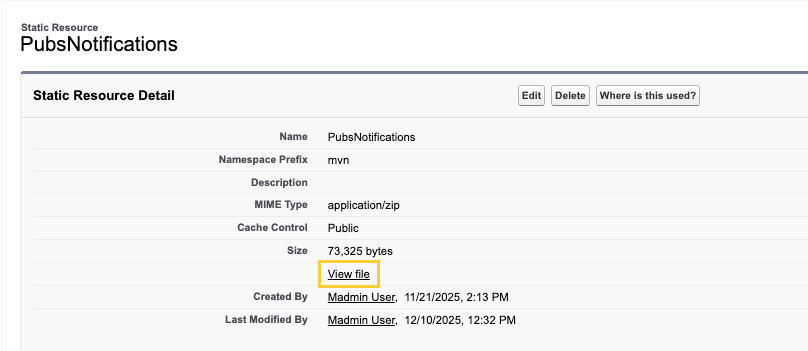
Clone the PubsNotifications static resource to your local system. To do this, open the PubsNotifications static resource and click View file to download it.
-
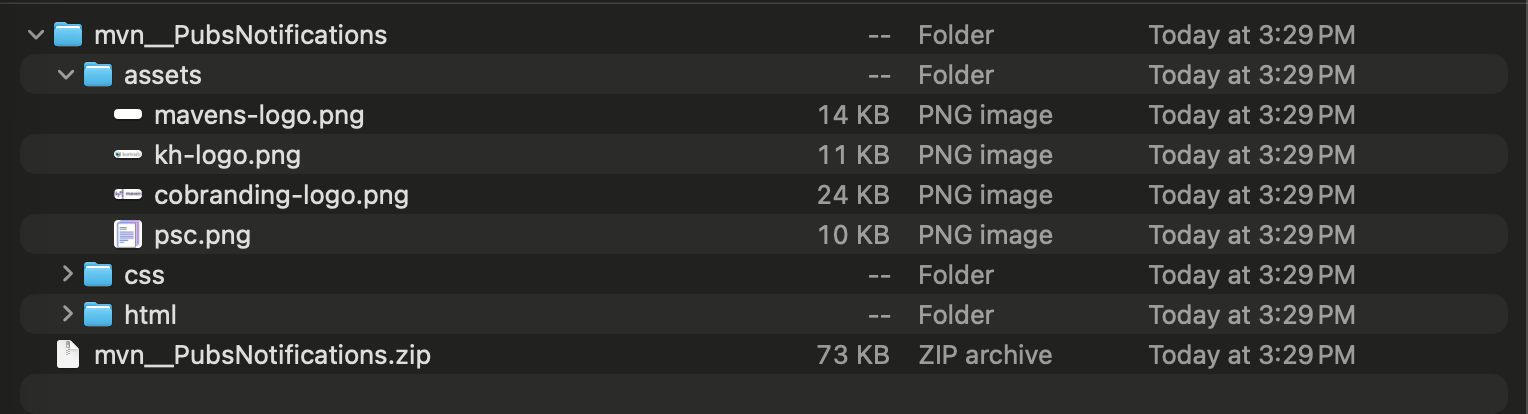
Open the downloaded ZIP file, add the required email logo, and compress the "assets", "css", and "html" folders into a new folder.
-
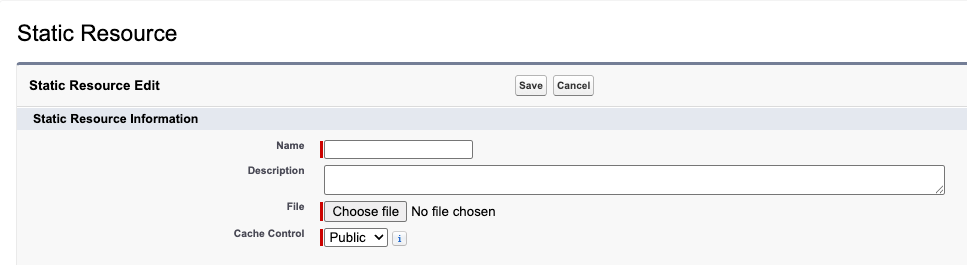
Now, create a new static resource with the following configuration:
-
Name: Enter a name.
-
File: Upload the ZIP file created in the previous step.
-
Cache Control: Set to Public.
-
-
Navigate to the Collaborator Portal (
mvn__PP_Collaborator_Portal__mdt) custom metadata type. Click Manage Collaborator Portals, and then open the Default collaborator portal record.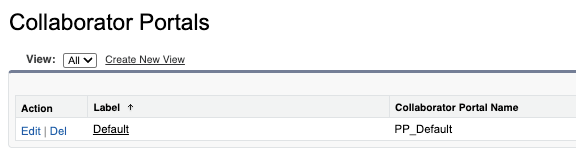
-
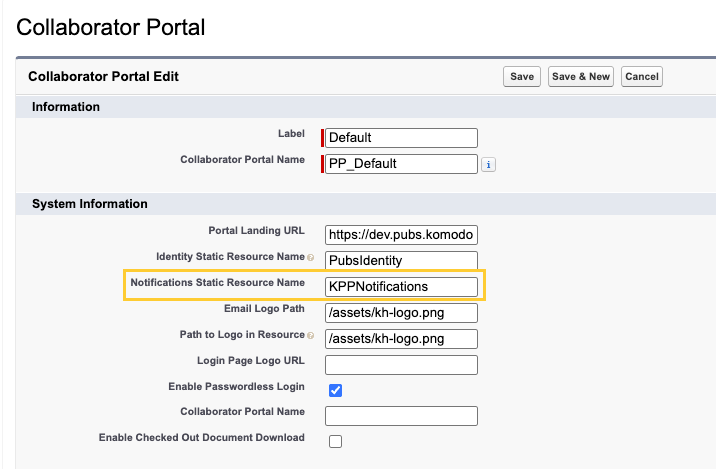
In the Notifications Static Resource Name field, enter the static resource name created in step 3.
-
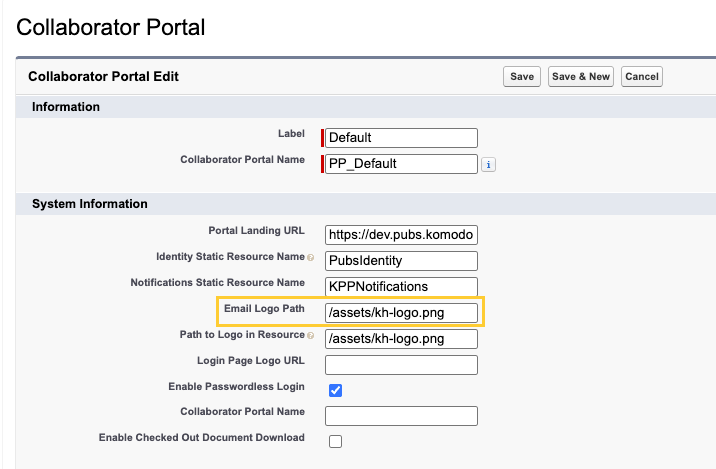
In the Email Logo Path field, enter the file path for the email logo.
-
Save the record.