Files
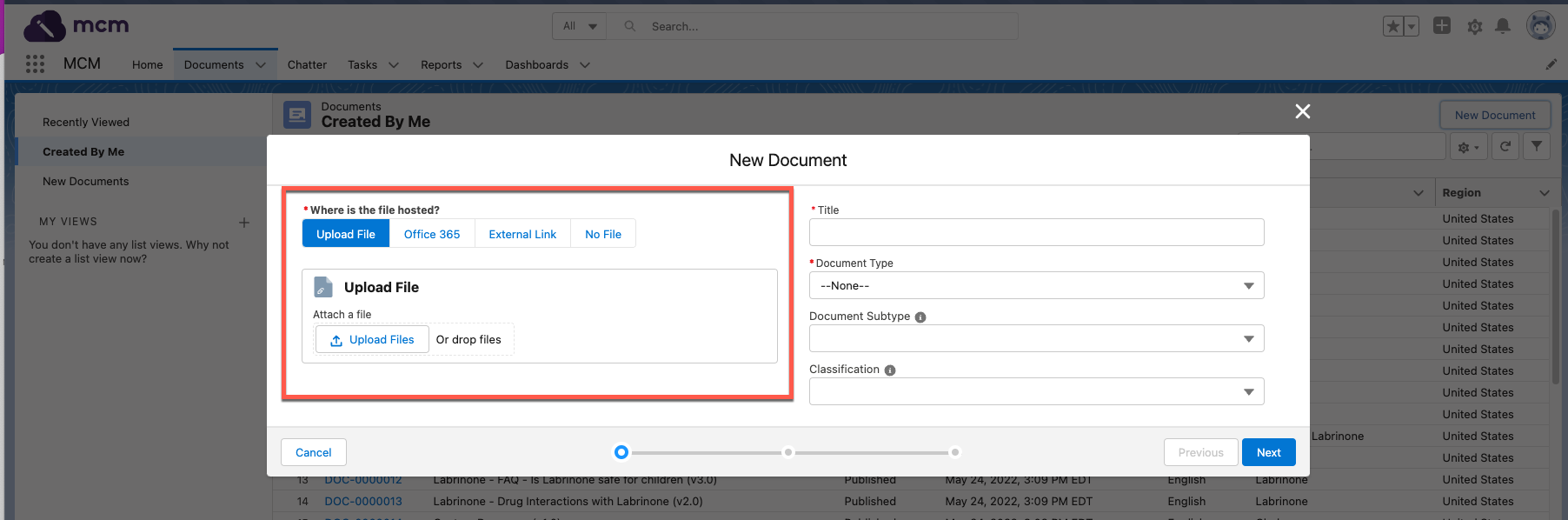
You can associate document versions to files and host the files either with Salesforce or externally.
Supported file types
Scientific Publications Cloud supports the file types that Salesforce supports. 2GB is the maximum supported file upload size. Files larger than 25MB may not be previewed and will need to be opened in another program. Visit Salesforce's documentation on File Size and Sharing Limits and Preview Files and Edit File Details.
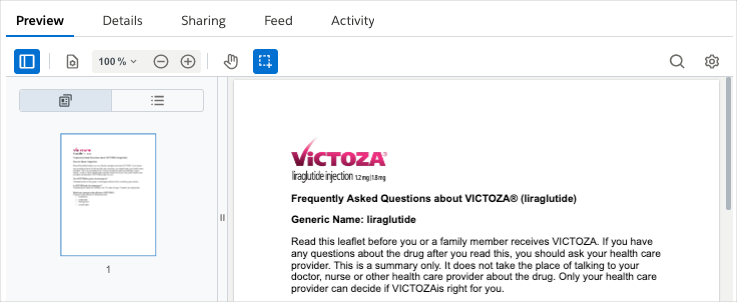
File previews
File previews are generated for files hosted in Salesforce and displayed
in the Preview tab on the document record page. The MCM-enhanced
document viewer attempts to render all files. If the file does not meet
the viewer's requirements, Salesforce's content previewer attempts to
generate the preview. If a document does not have a file and the Content
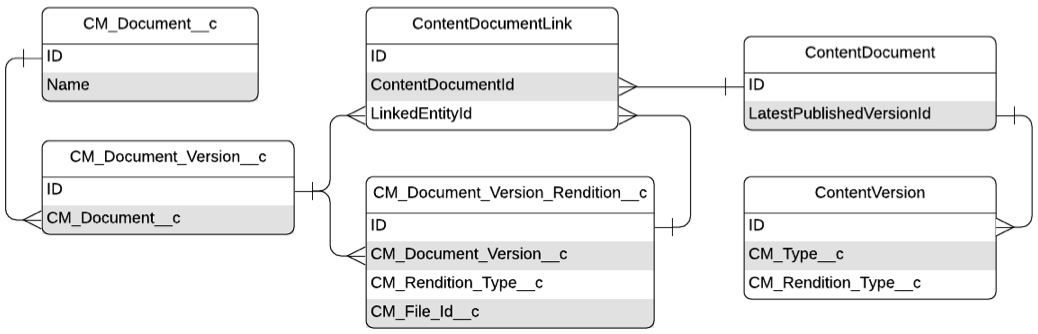
(rich text) (mvn__CM_Content_Rich_Text__c) field on the Document
Version (mvn__CM_Document_Version__c) record is available on the
document preview layout, then the rich text content will appear in place
of the file for the document preview instead.
Enhanced document viewer
The enhanced document viewer renders a preview of supported files and
enables you to interact with the files. With video files, you can use
the video timeline bar to play the videos from specific timestamps. With
PDF files, you can zoom in and out, search text, and copy and paste
selected text. To enable the enhanced document viewer, you must populate
the Enhanced Viewer Extensions (mvn__CM_Enhanced_Viewer_Extensions__c)
field on the Default (PP_Default)
MCM Global Setting
(mvn__CM_Global_Setting__mdt) custom metadata record to include all of
the file types that you want to be able to preview in your org (e.g.,
pdf,doc,docx).
You can also add annotations to PDF files as long as the files are not
part of a bundle document. To enable the annotating functionality,
activate the File Annotations (WV_File_Annotations)
Feature Activation
(mvn__Feature_Activation__mdt) metadata record and create a custom
Document State Role Permission
(mvn__CM_Document_State_Role_Permission__mdt) metadata record that
looks up to the Annotate (CM_Annotate)
Permission (mvn__CM_Permission__mdt)
metadata record. If you do not have the Annotate permission or if the
file is a package file or part of a bundle package, then annotations can
only be viewed and cannot be created. Video files do not support
annotations. All annotations are stored in the
File Marker (mvn__WV_File_Marker__b)
big object.
The enhanced document viewer only renders previews of files that meet these requirements:
-
The file must be a
mvn__CM_Document_Version__crecord. -
The file size must be less than 2mb.
-
The file extension must be supported. Supported extensions include the following:
| Text files | Media files |
|---|---|
| - .pdf - Microsoft Office documents: - .doc - .docx - .ppt - .pptx - .xls - .xlsx | - .bmp - .gif - .jpeg - .mp4 - .mov - .ogg - .png - .webm |
If a document does not meet these requirements, Salesforce's content previewer attempts to render the document.
Regenerating a file preview
If you need to regenerate a file preview, visit Salesforce's Regenerate a File Preview documentation for instructions.
Salesforce's content previewer
Salesforce's content previewer can render both
mvn__CM_Document_Version__c and ContentVersion files that meet
Salesforce's specified
criteria.
PDF renditions
PDF renditions are generated for doc, docx, xls, xlsx, ppt,
and pptx file extensions.
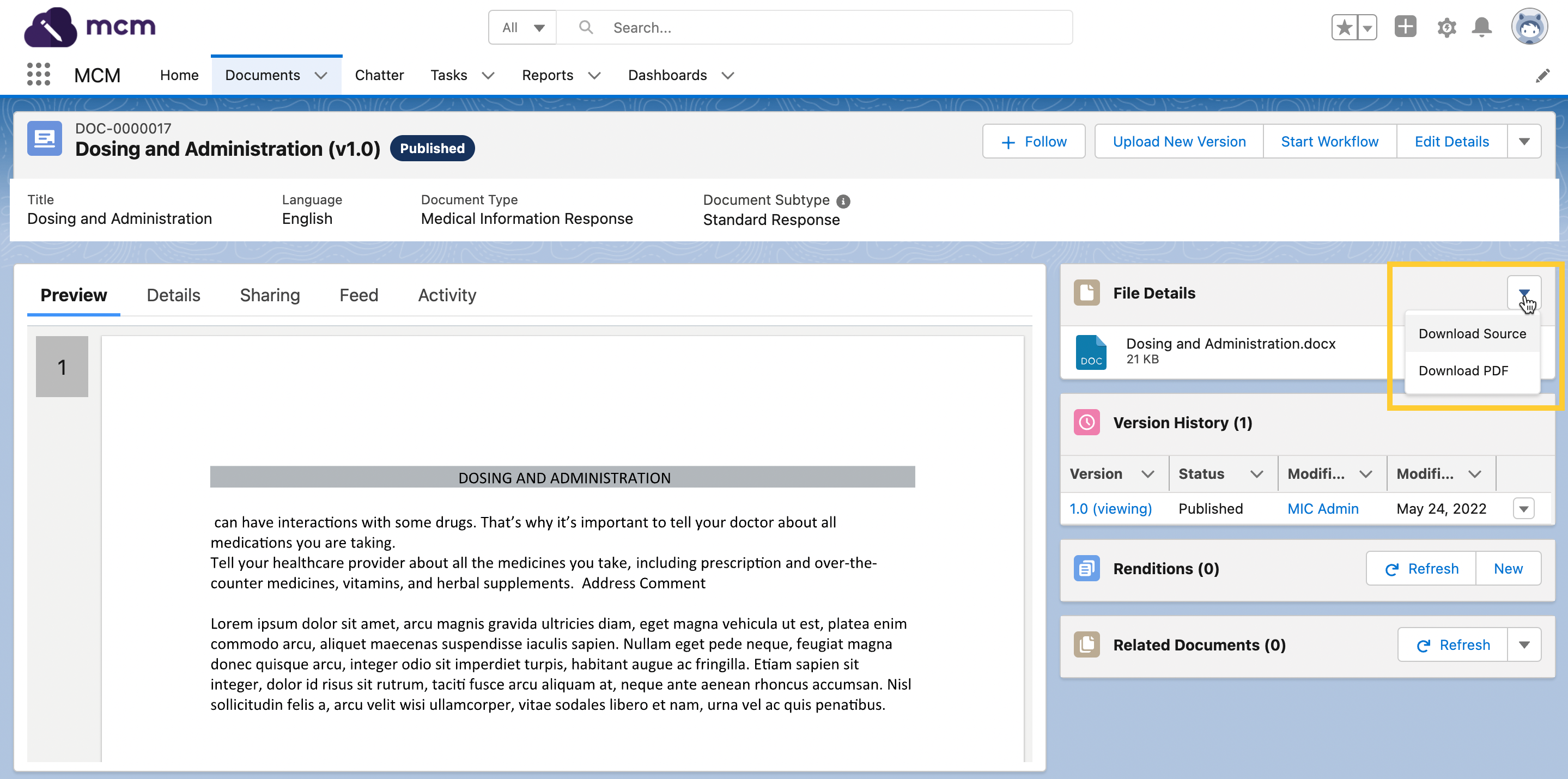
To download a PDF rendition when it is available, click the
Arrow menu
in the File Details component, and then click Download PDF.
menu
in the File Details component, and then click Download PDF.
If you do not like the PDF rendition that is generated, you can upload a Document Version Rendition. A rendition is a high quality, high fidelity file that you manually associate with a document version record and that usually takes the form of a PDF. Visit Renditions.
External files
Documents may also be associated to files hosted externally. To associate a new document to an external file, click External Link when creating a new document.
Scientific Publications Cloud does not have version control for externally hosted files.