Artificial Intelligence in Medical Information (AIMI)
To facilitate processes within Medical Information, Mavens Labs offers optional, add-on packages that utilize and augment Salesforce's standard Agentforce artificial intelligence (AI) platform. These packages, collectively referred to as Artificial Intelligence in Medical Information (AIMI), complement the Medical Information Cloud product by providing prompt templates specific to Medical Information, prompt flows for secure data retrieval within the product, as well as a new AIMI Prompt Selection modal that offers a procedurally driven UI for a "governed agentic AI" approach. This approach ensures that there remains a human in the loop with all of the enhanced automations and enables Medical Information specialists to have complete control over the additional efficiencies in interaction management. In doing so, AIMI provides these Medical Information specialists with recommendations, summaries, and general assistance that can improve the overall performance, quality, and delivery of their current work.
All of AIMI's capabilities and tools are optional, configurable, templated, and secure. They build on top of Salesforce's Agentforce, Einstein, and Data 360 platforms and, as such, have an immutable paper trail, secure data retrieval, and zero data retention to ensure that no client information is stored outside of client's systems.
Currently, Medical Information Cloud with AIMI offers two distinct AI capabilities. First, it provides several out-of-the-box prompt templates and prompt flows that securely retrieve some data, augment a given prompt with Einstein's generative AI, and then call Agentforce's default GPT-5 LLM to return a response to the user. Clients must update and configure these prompt templates and prompt flows accordingly because the default prompts include general pharmaceutical industry definitions that may not be sufficient for specific business needs. Second, it also provides an AIMI Prompt Component that contains an Ask AIMI button to open an AIMI Prompt Selection modal from any record page for users to use in place of Agentforce's chat experience. Users can select and run certain prompts, view the responses, and then take some action based on those responses. Clients must also configure the modal using the aforementioned prompt templates and flows and custom metadata. For more information on how to configure and use each feature, reference the Prompt templates and prompt flows and AIMI Prompt Selection modal sections below. For more information about Salesforce's AI features, reference their Agentforce and Einstein Generative AI page.
Warning
Customers must purchase their own Agentforce licenses to install and use the AIMI package, and users must be assigned the standard Prompt Template User (EinsteinGPTPromptTemplateUser) permission set to use any of the AIMI capabilities.
Prompt templates and prompt flows
Prompts instruct generative AI models on what and how to perform a specific task. The two tables below list all of the prompt templates and prompt flows that Medical Information Cloud and AIMI offer out of the box. By default, every prompt template is inactive while every prompt flow is active and overridable. Each prompt template can be used by both Agentforce and the AIMI Prompt Selection modal and calls one or more prompt flows to return some data. Admin users must configure each prompt template and prompt flow according to their specific business needs and then activate the prompt templates for the prompts to be run. If a prompt template is not active, Agentforce and the AIMI Prompt Selection modal will simply return an empty response without an error message. Admin users are also highly encouraged to create additional prompt templates as needed.
Prompt template | API name | Description |
|---|---|---|
Interaction: Adverse Event Recommendation | MAI_Interaction_AE_Recommendation | Recommends whether or not an adverse event may have occurred. NoteThe general pharmaceutical industry definitions in this out-of-the-box prompt template should be updated to include client-specific terms. |
Interaction: Product And Question | MAI_Interaction_Product_And_Question | Identifies the question and the product for a request based on the email message content on an interaction. |
Interaction: Product Complaint Recommendation | MAI_Interaction_Product_Complaint_Recommendation | Recommends whether or not a product complaint may have occurred. NoteThe general pharmaceutical industry definitions in this out-of-the-box prompt template should be updated to include client-specific terms. |
Interaction: Summary | MAI_Interaction_Summary | Generates a summary for an interaction, including its requests, adverse events, and product quality complaints. |
Request: Suggest Category | MAI_Request_Suggest_Category | Suggests a category and a sub-category for a request. NoteThe general pharmaceutical industry definitions in this out-of-the-box prompt template should be updated to include client-specific terms. |
Prompt flow | API name | Triggering object | Description |
|---|---|---|---|
Interaction: Get Available Products | MAI_Interaction_Get_Available_Products | Interaction | Retrieves all Product ( |
Interaction: Get Content Notes | MAI_Interaction_Get_Content_Notes | Interaction | Retrieves all Content Note ( |
Interaction: Get Email Content | MAI_Interaction_Get_Email_Content | Interaction | Retrieves the first Email Message ( |
Interaction: Get Request Details | MAI_Interaction_Get_Request_Details | Interaction | Retrieves all Request ( |
Request: Get Available Categories | MAI_Request_Get_Available_Categories | Request | Retrieves all available Category ( |
AIMI Prompt Selection modal
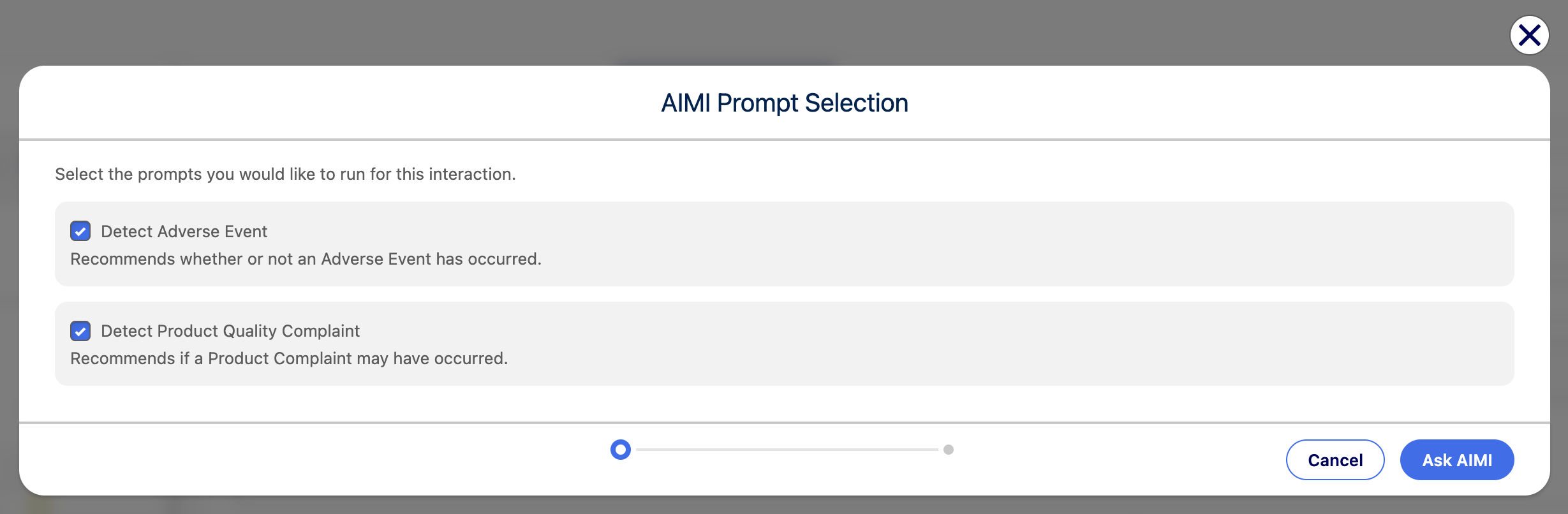
The AIMI Prompt Selection modal is a Lightning Web Component that acts as an optional, alternative UI to Agentforce; while both Agentforce and the AIMI Prompt Selection modal can run any active prompt template, including those listed in the Prompt templates and prompt flows section above, the former is more conversational and casual while the latter is more directional and declarative. Additionally, with the AIMI Prompt Selection modal, users can select and run one or more prompts to get some response and then run one or more flows to follow up on the provided response. For example, a user may use the modal to determine whether or not an adverse event or product complaint may have occurred based on a given interaction and, if so, run an autolaunched flow to create an Adverse Event (MED_Adverse_Event__c) record for the Interaction (Case) record. Each prompt template can only appear and be selected in the AIMI Prompt Selection modal if it has a corresponding AIMI Prompt Option (MAI_AIMI_Prompt_Option__mdt) metadata record. The table below lists the AIMI Prompt Option metadata records that Medical Information Cloud offers out of the box.
Warning
Even though Medical Information Cloud offers the following AIMI Prompt Option metadata records that each calls a prompt template, admin users must still configure and activate the out-of-the-box prompt templates before using and running them.
Prompt option | API name | Prompt template |
|---|---|---|
Detect Adverse Event | MED_Detect_Adverse_Event | MAI_Interaction_Product_Complaint_Recommendation |
Detect Product Quality Complaint | MED_Detect_PQC | MAI_Interaction_AE_Recommendation |
Setup and configuration
To set up and configure AIMI for the AIMI Prompt Selection modal:
Create a prompt template for each set of instructions or tasks that the Einstein generative AI should perform. Reference Salesforce's documentation on how to Create a Prompt Template for more information. Alternatively, you may configure and activate one or more of the prompt templates listed in Table 159, “Out-of-the-box prompt templates” above.
(Optional) Create a prompt flow for each individual instruction or task that may be repeated. These prompt flows can then be referenced inside of the prompt templates. Alternatively, you may modify one or more of the prompt flows listed in Table 160, “Out-of-the-box prompt flows” above.
Create an AIMI Prompt Option (
MAI_AIMI_Prompt_Option__mdt) custom metadata record for each prompt template that should appear in the AIMI Prompt Selection modal.(Optional) Create an autolaunched flow for an action that can be performed following a response from AIMI. This flow can be set on the AIMI Prompt Option metadata record.
The AIMI Prompt Selection modal can be opened and used on any sObject's record page. To enable it:
Open the desired record page in the Lightning App Builder (e.g., an Interaction record page).
Search for and select the AIMI Prompt Component (
maiAimiPromptComponent) and drag and drop it onto the record page (e.g., under the MIC - Notepad component on an Interaction record page). This will appear as an Ask AIMI button.Click Save.
Usage
To use the AIMI Prompt Selection modal:
Click the Ask AIMI button. The AIMI Prompt Selection modal will open with a list of available prompt templates to run based on the available AIMI Prompt Option metadata records whose SObject API Name (
MAI_SObject_Name__c) field equals the sObject of the record page that the AIMI Prompt Component is currently on.Select the prompt(s) that you wish to run and then click Ask AIMI. AIMI will run the prompt template(s) and update the AIMI Prompt Selection modal with the corresponding response(s) as well as any flows that can be run as follow-up actions to the response(s).
Select the flow(s) that you wish to run and then click Run. AIMI will run the flow(s).