Spring '26 (v18) Release Notes
This topic contains the V18 release notes for Medical Information Cloud. V18 is the Spring '26 release. The release notes are organized into these high-level sections:
-
Installation and upgrades - link to install or upgrade to V18.
-
New features - new features and functionalities introduced in V18.
-
Updated features - existing features and functionalities enhanced in V18.
-
Defect fixes and maintenance - defects and maintenance items fixed in V18.
-
Metadata changes - changes to the underlying data models, user permissions, or system configurations included in V18.
-
Deprecated and deleted items - components of the product that have been deprecated, removed, or retired in V18.
-
Required pre-install and pre-upgrade actions - required actions administrators must take before installing or upgrading to V18.
-
Recommended post-upgrade actions - recommended actions administrators should take after upgrading to V18.
As this page is maintained and updated over time to ensure accurate and timely information, Mavens recommends referencing the release notes online rather than printing and using static versions of the page.
The release notes on this page cover the Spring '26 work items that have been documented to date. Additional features, fixes, and metadata changes that ship in Spring '26 will be appended to this page as their documentation lands.
Installation and upgrades
The Medical Information Cloud Spring '26 release can be installed with the Install Service at http://install.komodohealth.com/products/mic/latest. New installs of Medical Information Cloud will be on the latest release while current customers will need to run and deploy the latest update.
Remember to complete the steps in the Recommended post-upgrade actions section below as appropriate.
New features
The V18 release of Medical Information Cloud contains several new features whose functionalities are detailed below. Details about enablement and configuration are included within the product documentation.
Region lookup on Interaction (Case)
Medical Information Cloud now keeps each Interaction (Case) record linked to a Region (Region__c) record that matches the Country selected on the interaction.
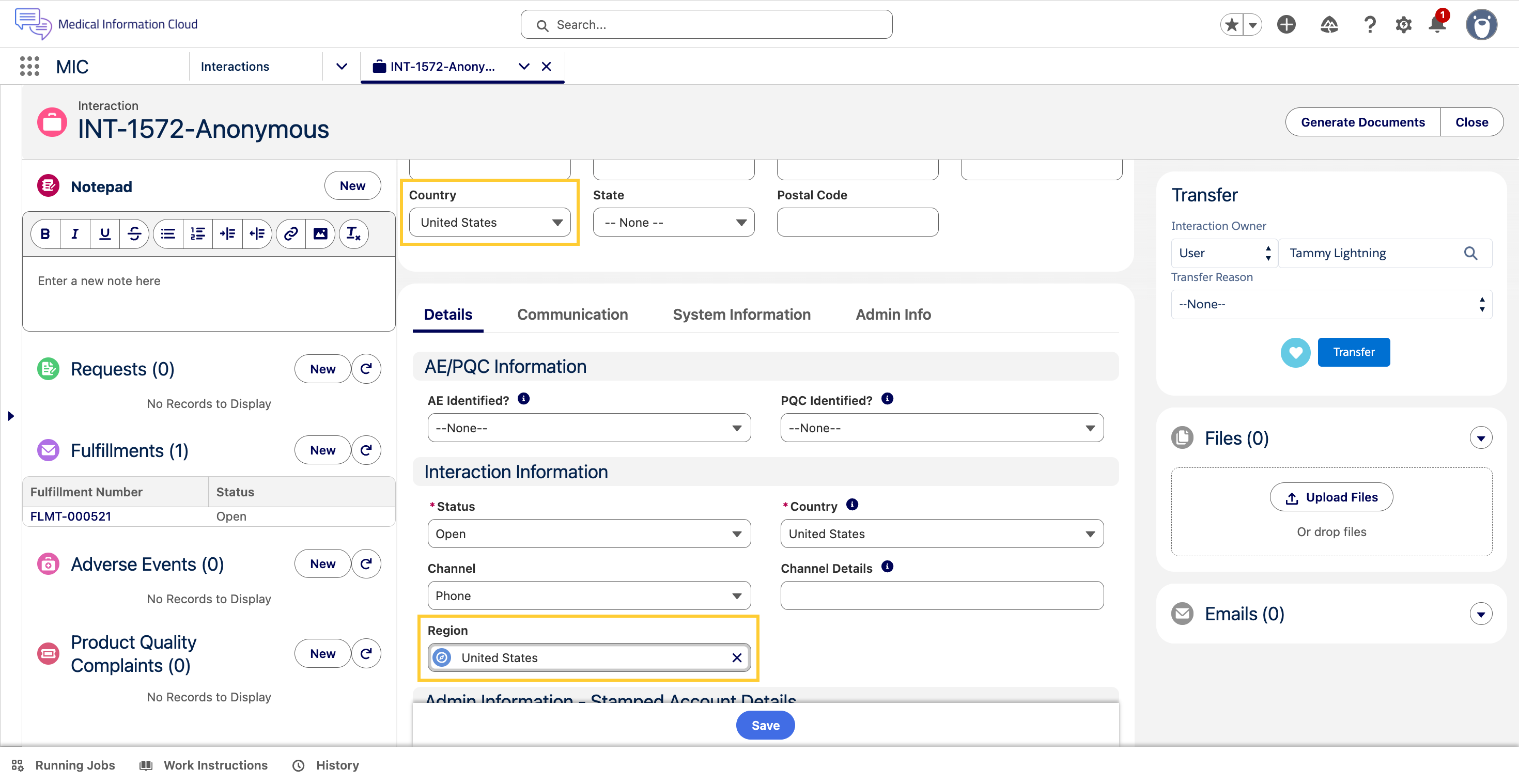
The Region (MED_Region__c) lookup field on the Interaction (Case)
object points to the Region (Region__c) record whose Country ISO
Code (Country_ISO_Code__c) matches the value of the Country
(MED_Country__c) picklist on the interaction. The Set Case Region
trigger action keeps the lookup in sync: when the Country field is set
or changed, the trigger action stamps the matching Region record's ID
on the lookup, or clears the lookup if no Region record matches.
The field is visible on the Case - Lightning Admin layout and is
hidden from the standard Case - Lightning layout. Read access is
granted by the Medical Information Cloud Admin
(MED_Medical_Information_Cloud_Admin) and Medical Information Cloud User (MED_Medical_Information_Cloud_User) permission sets.
For product documentation, including more information on how to use and configure the feature, refer the Region lookup on Interaction section.
Related work item(s): MIC-4001
Digital Fulfillment and cover letter enhancements
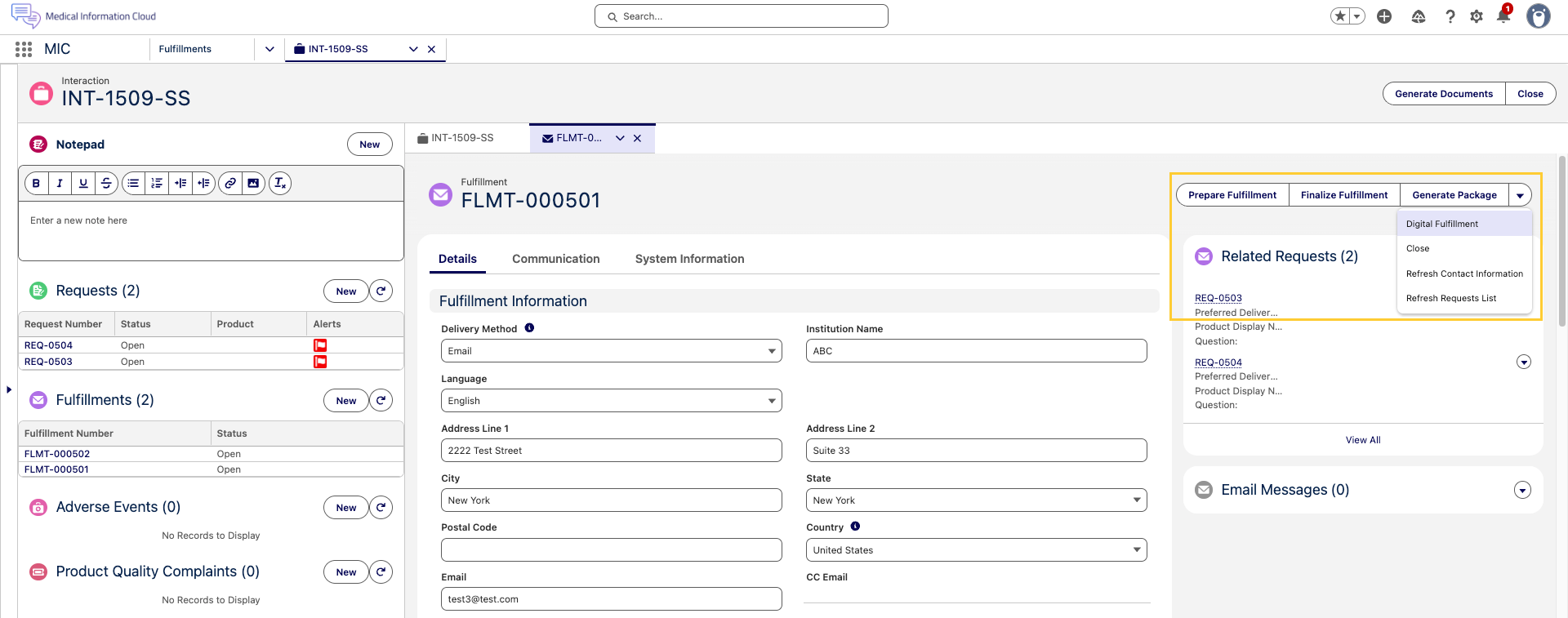
Medical Information Cloud now ships an updated Fulfillment flow that separates cover letter assembly from final document delivery. Fulfillment specialists can prepare and review the cover letter and the case documents independently, then merge the resulting PDFs into a single finalized package before sending. The new flow uses the Lightning email composer for digital delivery and replaces the legacy Configure Fulfillment Package modal title with Enhanced Email Composer to better reflect what users see on the screen.
To support the new flow, the Fulfillment (MED_Fulfillment__c) object has two new rich text fields:
-
Questions (
MED_Questions__c) - It holds the list of questions answered by the fulfillment. The field is populated automatically when the Digital Fulfillment (MED_Generate_Fulfillment_Letter) quick action is used and is also refreshed by the Refresh Request List (MED_Refresh_Request_Fulfillments) quick action. -
Attachments (
MED_Attachments__c) - It holds the list of files to be sent as attachments with an email fulfillment. The field is refreshed automatically whenever files are attached to or removed from the Fulfillment (MED_Fulfillment__c) record.
The new Fulfillment flow is exposed on Fulfillment records through two new quick actions:
-
Prepare Fulfillment (
MED_Merge_Cover_Letter) - It opens a modal where the user selects cover letter components and case documents, reorders them, and chooses delivery options for each section. When the user clicks Merge, Medical Information Cloud generates one PDF for the cover letter components and a second PDF for the case documents. -
Finalize Fulfillment (
MED_Finalize_Merge_Letter) - It opens a modal that lists the files generated by Prepare Fulfillment in the desired final order. When the user clicks Merge, Medical Information Cloud combines the selected files into a single final fulfillment package PDF and deletes the intermediate documents.
The split between Prepare Fulfillment and Finalize Fulfillment preserves the formatting of each source document. Cover letter components and standard response documents are converted to PDF before being combined, which prevents the cover letter formatting (margins, fonts, headings) from being applied to the standard response document during the final merge.
To use this functionality, an administrator must add the new
Prepare Fulfillment (MED_Merge_Cover_Letter) and
Finalize Fulfillment (MED_Finalize_Merge_Letter) quick actions to the Fulfillment (MED_Fulfillment__c) page layout(s) in the org. The actions are not deployed to any specific page layout on upgrade.
Additionally, the legacy Generate Package (MED_Generate_Fulfillment_Package) and Email Fulfillment (MED_Email_Fulfillment) actions remain available on the Fulfillment (MED_Fulfillment__c) record so that customers who have not yet adopted the new flow can continue to use the existing process.
The new flow assumes that the Global Case Documents Template and Global Final Template DDP records exist and that the
Local Settings (MED_Local_Setting__mdt) record for each country references those DDPs in the Template Case DDP Name
(MED_Template_Case_DDP_Name__c) and Template Final DDP Name
(MED_Template_Final_DDP_Name__c) fields. Without those entries,
Prepare Fulfillment and Finalize Fulfillment will not produce the expected output.
For product documentation, including more information on how to use and configure Digital Fulfillment, reference the Digital Fulfillment section.
Related work item(s): MIC-4066, MIC-4191, MIC-4319
Presubmit Validation for Adverse Events
Administrators can now enforce client-specific completeness checks on an Adverse Event (MED_Adverse_Event__c) record and its child records before the Adverse Event is submitted to safety, either through the Send To Safety (MED_Send_To_Safety) quick action or through the Generate E2B (MED_Generate_E2B_Action) quick action (if added in the Page Layout).
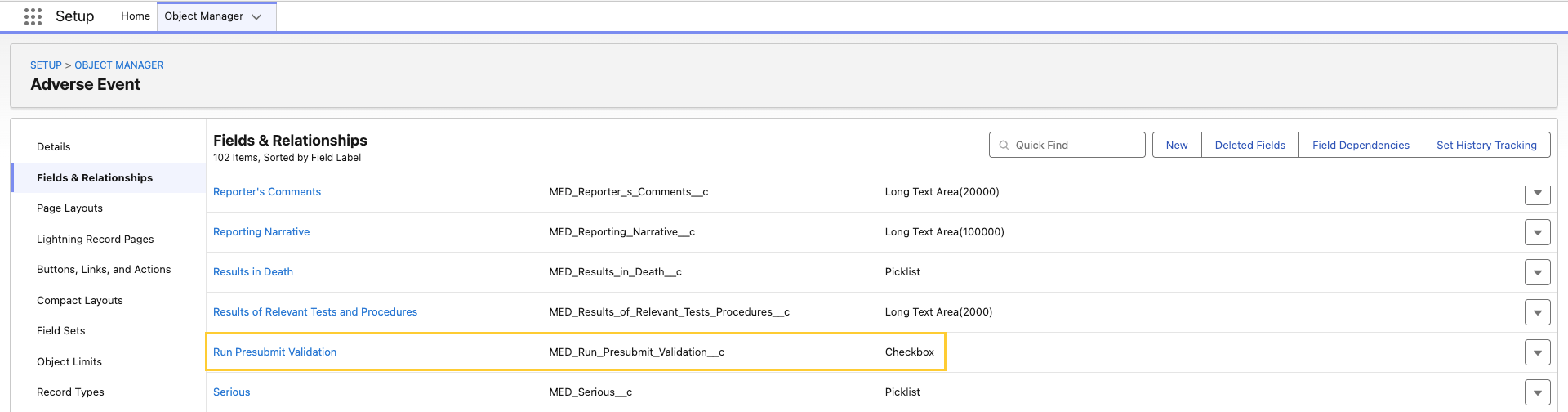
A new Run Presubmit Validation (MED_Run_Presubmit_Validation__c) checkbox field is available on the Adverse Event (MED_Adverse_Event__c) object and its child objects.
For product documentation, including detailed information on how to configure and use this new feature, reference Presubmit Validation for Adverse Events.
Related work item(s): MIC-4136, MIC-4238
Account Search optimization for omnichannel workflows
The MIC - Case Accounts Quick Search
(mvn.medCaseAccountsQuickSearch) component, also known as the
Quick Search component or Account Search, is no longer scoped to the
Interaction (Case) object alone. Administrators can now add this
component to any object's Lightning Record Page or Experience Cloud
Object Page as long as that object has a relationship to the
Interaction (Case) object. This unblocks Account Search on
omnichannel surfaces such as the Messaging Session record page, where
representatives must locate or create an account before opening an
interaction.
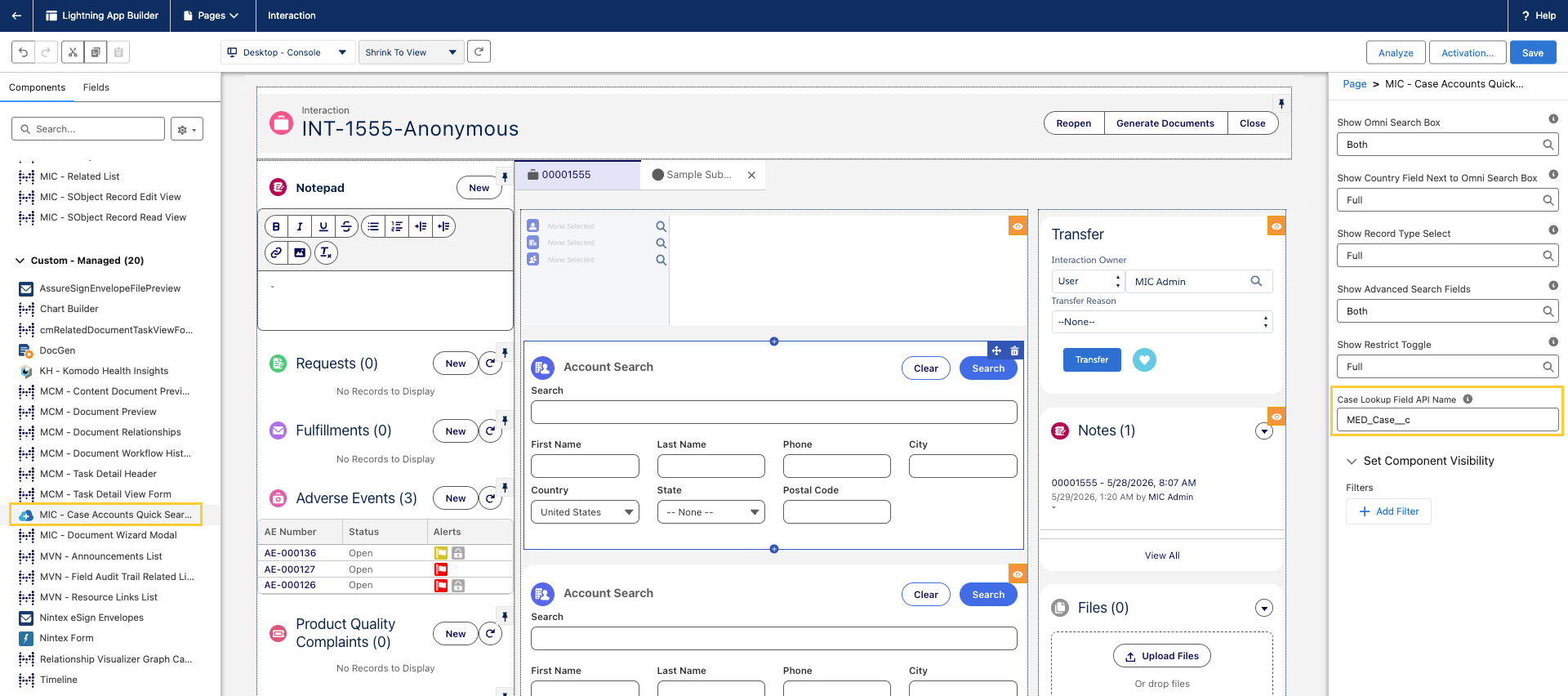
To support generic placement, the component exposes a new Case Lookup
Field API Name property and a new Apex method
(MED_AccountSearchCtrl.getObjectApiNameByRecordId) that resolves the
host object's API name at runtime. If the Case Lookup Field API Name
property is left blank, the component falls back to the standard
mvn__MED_Case__c lookup field to preserve the previous behavior for
customers whose custom objects already use that lookup convention.
For product documentation, including step-by-step configuration in the Lightning App Builder, reference the Quick Search component section.
Related work item(s): MIC-3144, MIC-3971
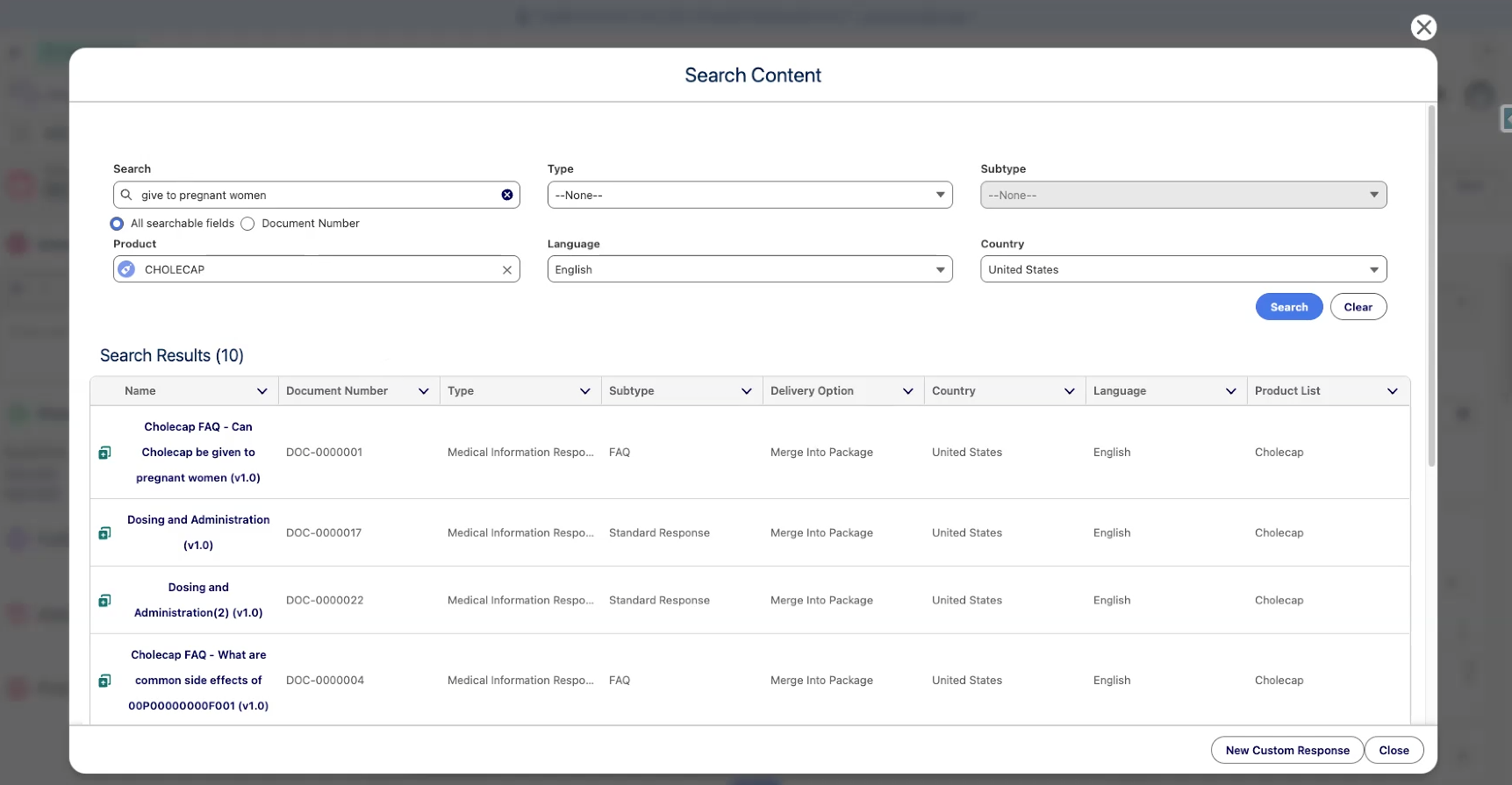
Configurable Content Search with Data 360 support
Medical Information Cloud now gives administrators per-request control over whether a Regulated Content Cloud published-document search runs against standard Einstein search or Data 360. A new custom metadata type, Content Search Settings (mvn__CM_Content_Search_Settings__mdt), holds records whose criteria match attributes of the inbound search — such as Country, Channel, or whether the request originates from the published-document service. When a record matches, its Search Algorithm, Search Type, Search Index, Data Space, and Min Search Score are applied to the request before it runs.
Data 360 is a new content search backend introduced in Spring '26. Administrators can, for example, route US published-document searches to Data 360* while keeping other countries on Einstein, or limit Data 360 to phone-channel searches. When no Content Search Settings record matches an inbound request, the search falls back to standard Einstein search.
For product documentation, including configuration steps and criteria examples, see Content Search Configuration.
Related work item(s): MIC-4568
Updated features
Initial focus on the Notepad component when opening an Interaction
To reduce the number of clicks needed before a user can start typing
notes during a call or while triaging an Interaction (Case), the
Notepad (medNotepad) Lightning component now places the cursor in its
rich text editor automatically when the Interaction record page loads.
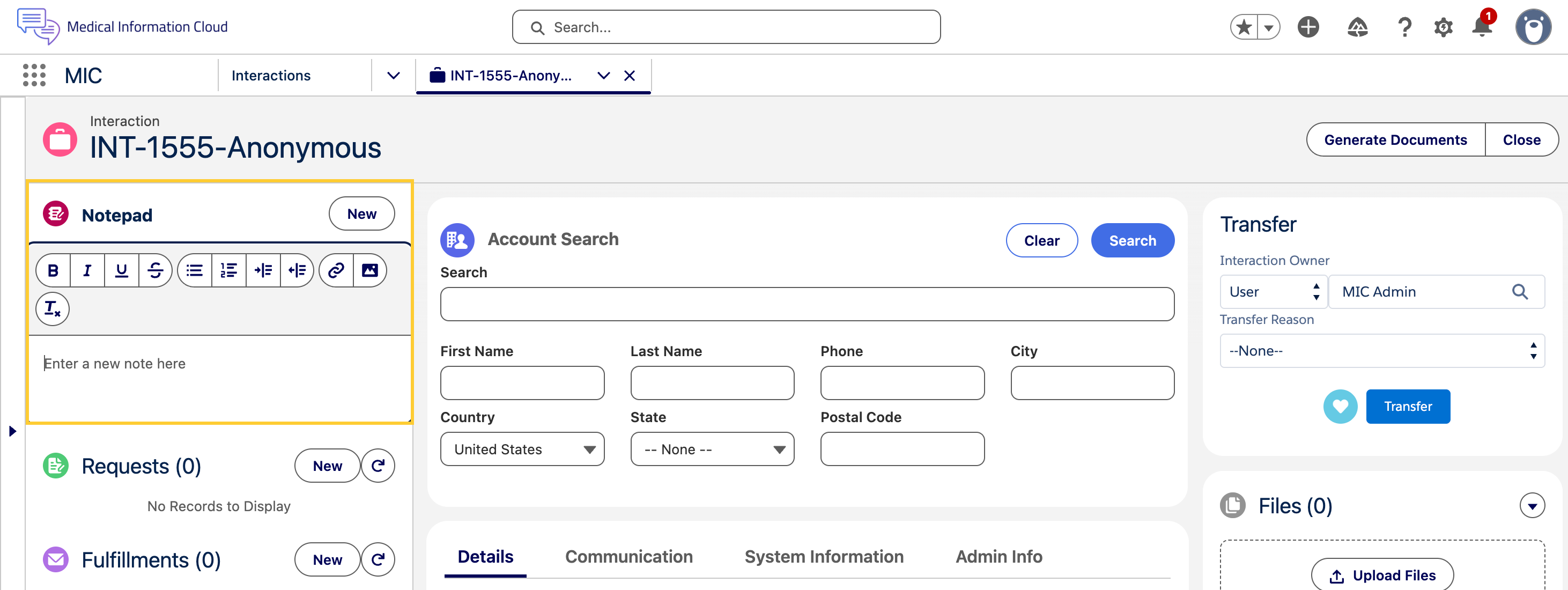
Earlier, the page opened with focus on the Name (First Name/ Last Name) field of the Account Search widget, which required users to manually click into the Notepad before they could begin typing.
This change applies to both new and existing Interaction records and runs once per page load. If the Notepad component is not on the Interaction's Lightning record page, the application falls back to the standard Salesforce default focus behavior for that page (typically the first editable field in the Highlights Panel or Layout). This update is shipped "on" by default for all customers and no additional configuration is required.
Reference the Notepad section for more details.
Related work item(s): MIC-1382
Unique filenames for generated E2B (ICSR) files
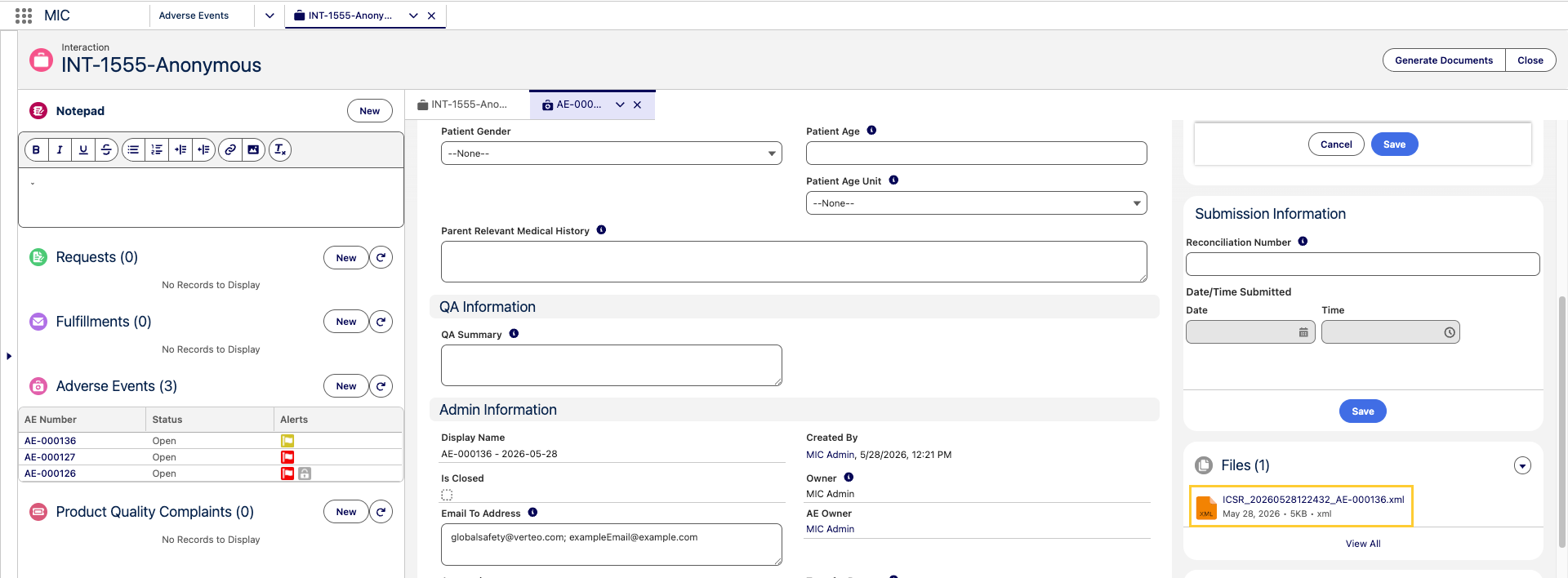
Generated E2B (ICSR) XML files now include the Adverse Event Name in their filename so that each generated file is uniquely identifiable.
ICSR Batch Number (MED_ICSR_Batch_Number__c) is the field where the identifier is stored.

The new filename pattern is ICSR_<yyyyMMddHHmmss>_<Adverse Event Name>.xml.
Reference the E2B(R3) generation section for more details. section for more details.
Related work item(s): MIC-4277
Standard configuration enhancements
The following improvements are included in the standard MIC configuration. Customers on customized orgs may need to apply the equivalent changes to their own configuration.
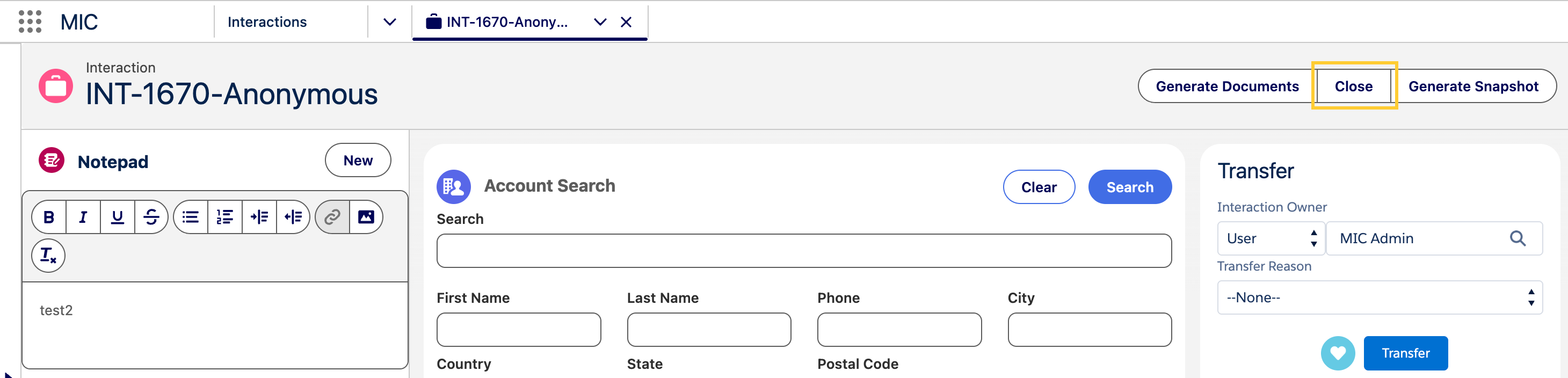
Close all related records from a single action
A Close button is now available on the Interaction page, allowing you to close all open records related to an interaction in one action.
Pending Reconciliation views on the Home page
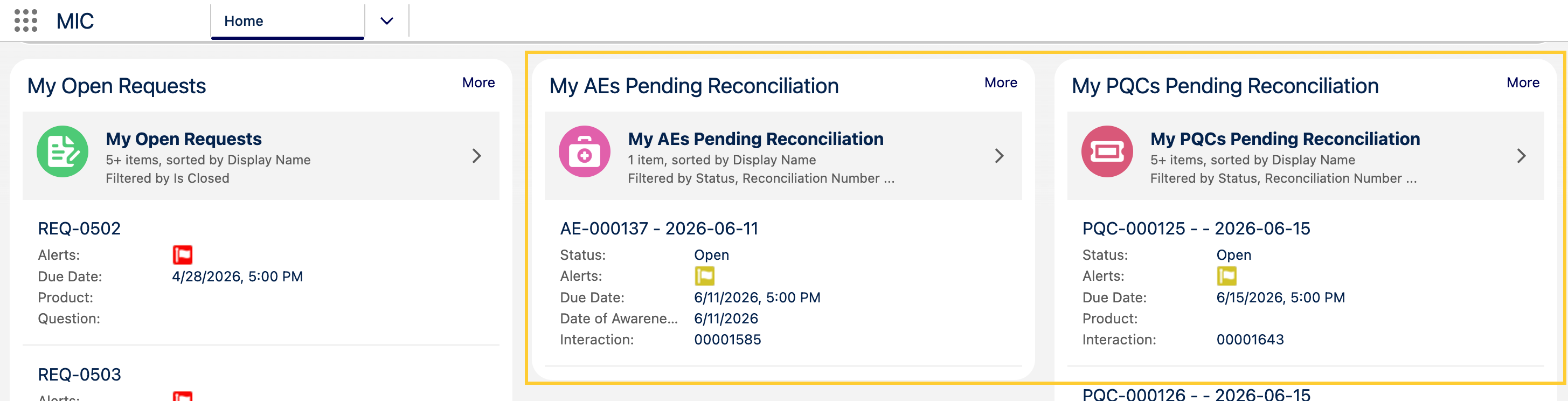
The Home page now surfaces the My AEs Pending Reconciliation and My PQCs Pending Reconciliation list views, so you can quickly see records that have been submitted but do not yet have a Reconciliation Number. The AE Reconciliation and PQC Reconciliation reports are now grouped by the Reconciliation Group column for easier review.
Related work item(s): MIC-4348
Highlights panel for closed Adverse Event records
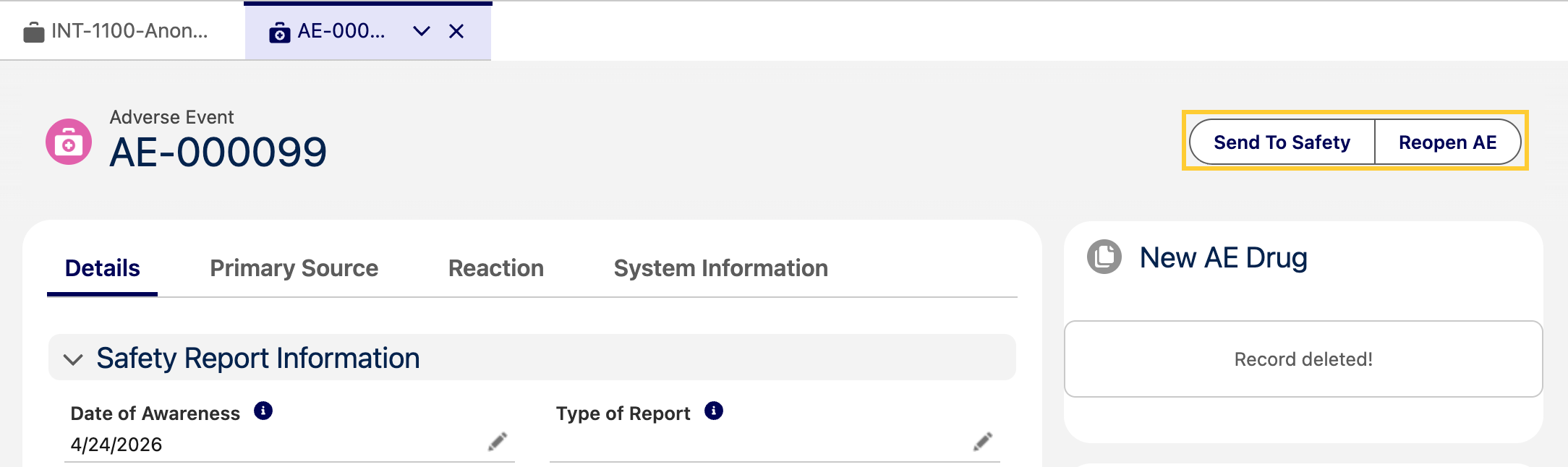
Previously, when an Adverse Event (AE) was Closed, the highlights panel was hidden, leaving users with no way to reopen the AE or take further action on it.
The AE Lightning page now displays the highlights panel for both open and closed AEs, with the appropriate actions in each state. On a closed AE, you can now Reopen AE, and Send to Safety when E2B is enabled.
Related work item(s): MIC-4329
Field Audit tracking for Content Version and Content Document
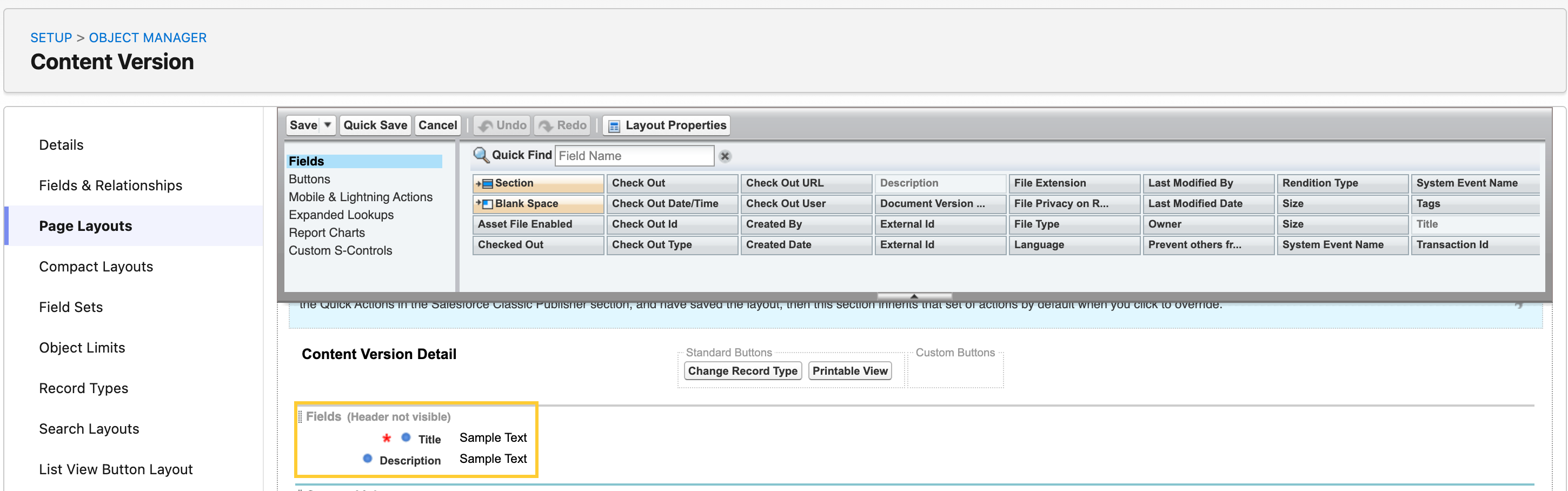
MIC now supports Field Audit Settings (mvn__Field_Audit_Settings__mdt) for the Content Document (ContentDocument) and Content Version (ContentVersion) objects. Administrators can configure auditing on the Title and Description fields, and changes to those fields are captured in the Field Audit Log (mvn__Field_Update_Audit_Log__b) for a complete history of file edits.
Related work item(s): MIC-4242
Product Mapping setup for MIR integration
Product matching for Medical Information Requests (MIRs) is now simpler and more predictable. When a request comes into MIC Inquiry Management via integration, MIC always evaluates the Value Mappings first to find a matching MED_Product__c record. If no match is found in the Value Mappings, MIC then falls back to matching a MED_Product__c record by the value in its Name field.
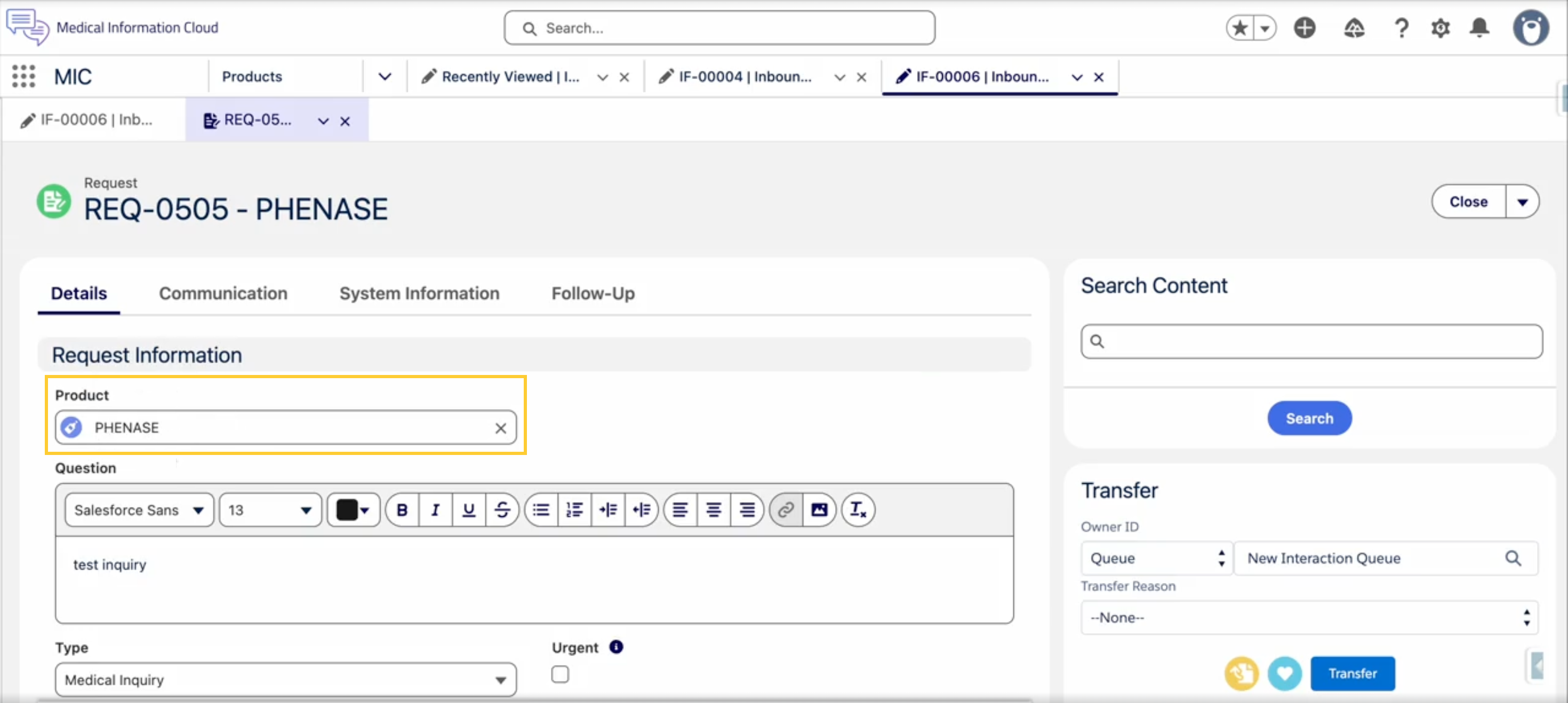
The Product Match Strategy Global Setting has been removed because it was redundant. Previously, applying a value mapping required two steps: adding the entry to the Value Mapping table and toggling the Global Setting to use the mapping. Now, creating the mapping is all that's required — MIC honors the Value Mapping table automatically whenever it contains entries. If the Value Mapping table is empty, behavior is unchanged - MIC matches products by Name, exactly as before.
See Inbound Forms for details.
Related work item(s): MIC-4222
Global MedDRA Version Setting for E2B
The MedDRA version for E2B submissions is now configured as a single global value in E2B Settings, rather than mapped individually per field. Because the E2B specification requires the same MedDRA version across an entire file, administrators now set it once and it is applied automatically whenever a MedDRA term is used. If no MedDRA term is available, no version is set.
All existing MedDRA Version (MedDRA_version) field mappings are deprecated (see Deprecated and deleted items) and should be migrated to the Global Setting. Existing configurations remain backward compatible, and any local override that is set continues to take precedence over the Global Setting. After upgrading, set the MedDRA version in E2B Settings.
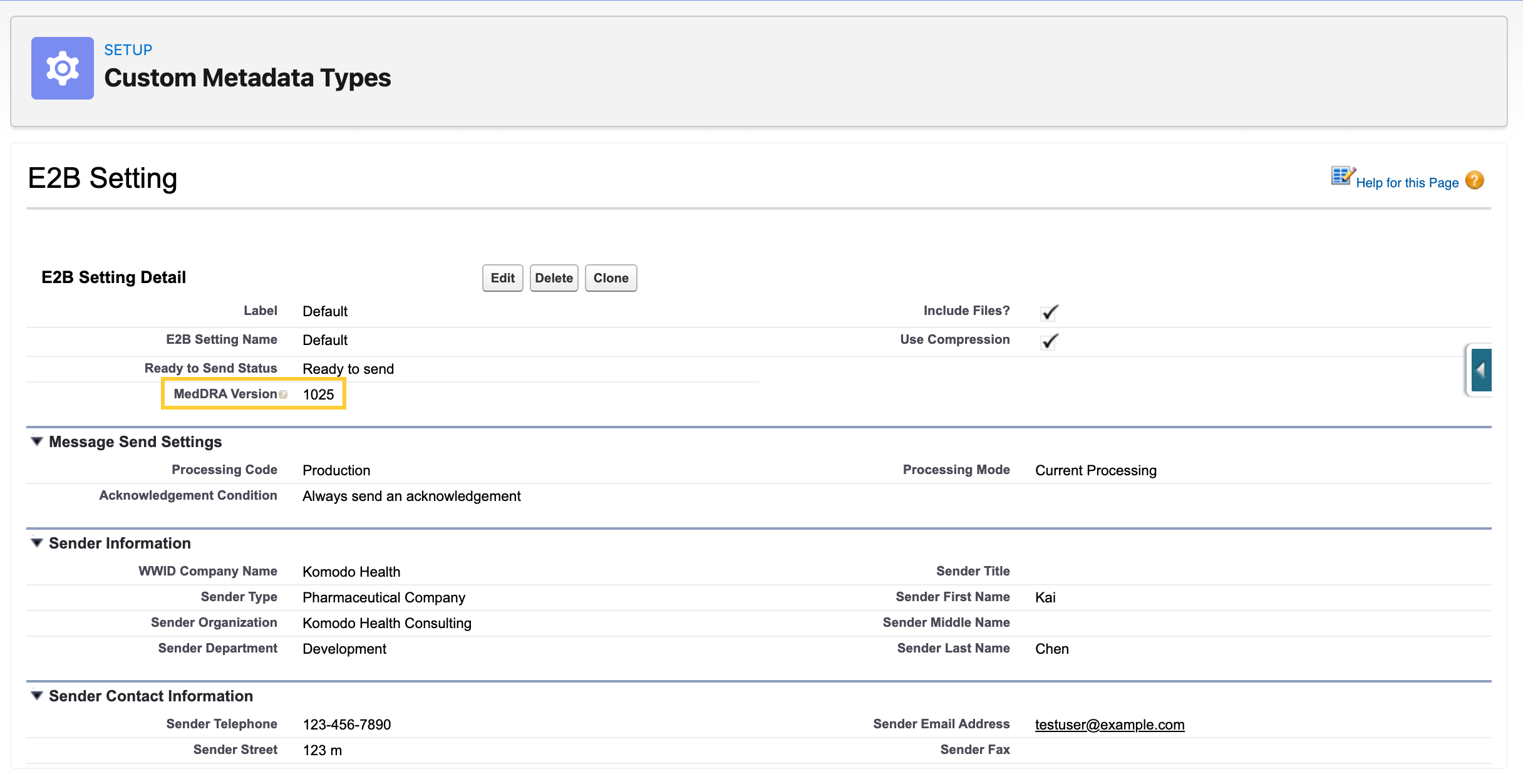
For configuration steps, see Set the global MedDRA version on the E2B Setting custom metadata record below. For the broader E2B(R3) feature reference, see the E2B(R3) generation section on the Primary objects page.
Related work item(s): MIC-3909
Defect fixes and maintenance
The following items detail defects and maintenance fixes in the Spring '26 release.
E2B: telecom tags missing prefix
In generated E2B files, \<telecom\> values were output as raw telephone numbers without the scheme prefix (tel:, fax:, or mailto:) required by the ICH E2B(R3) specification. This affected the telecom tags used in C.2.r.2.7, C.3.4.6, C.3.4.7, and C.3.4.8.
E2B C.2.r.2.7 (Reporter's Telephone) now correctly adds the tel: prefix to the value when it is not already present. If a customer has already added the prefix (for example, via a formula field), MIC detects it and does not duplicate it.
Sender telephone, fax, and email values are written to the generated XML when configured on the MED_E2B_Setting__mdt custom metadata type. E2B C.3.4.6, C.3.4.7, and C.3.4.8 (Sender's telephone, fax, and email) now have \<telecom\> elements added to the XML with the appropriate tel:, fax:, and mailto: prefixes. If a value is not configured for one of these fields, no \<telecom\> element is added for it.
Where a nullFlavor_\<value\> is used, the element is generated with the corresponding nullFlavor attribute — for example, a Sender's phone value of nullFlavor_MSK produces <telecom value="tel:" nullFlavor="MSK"/>.

Related work item(s): MIC-3861
E2B picklist values not E2B(R3)-aligned
Several E2B picklists were still populated with legacy E2B R2 values instead of the current R3 values. As a result, generated E2B files could contain values that did not conform to the R3 format.
The E2B picklists have now been updated to use E2B R3 values, so generated E2B output now conforms to the R3 format. Legacy R2 values (such as µg) are retained as inactive picklist values to preserve existing records, while the active values reflect the R3 standard.

Related work item(s): MIC-3752
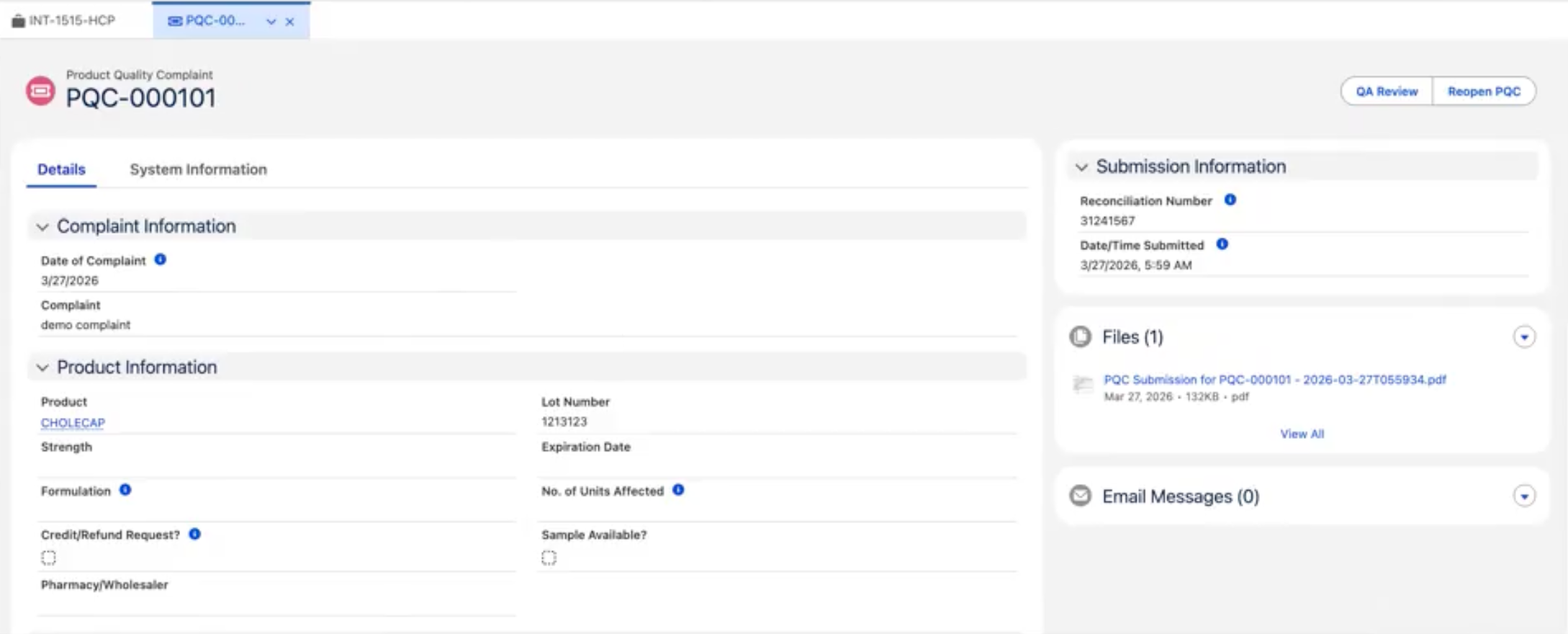
Enhanced Record Edit shows incorrect layout after PQC submission
After a PQC record's Status is set to Submitted, the Enhanced Record Edit (medEnhancedRecordEdit) component loaded with the wrong layout and kept all fields editable until the user manually refreshed the browser.
The component now re-evaluates its layout whenever the underlying record's Status changes, so the correct read-only layout is applied immediately after submission.
Related work item(s): MIC-4333
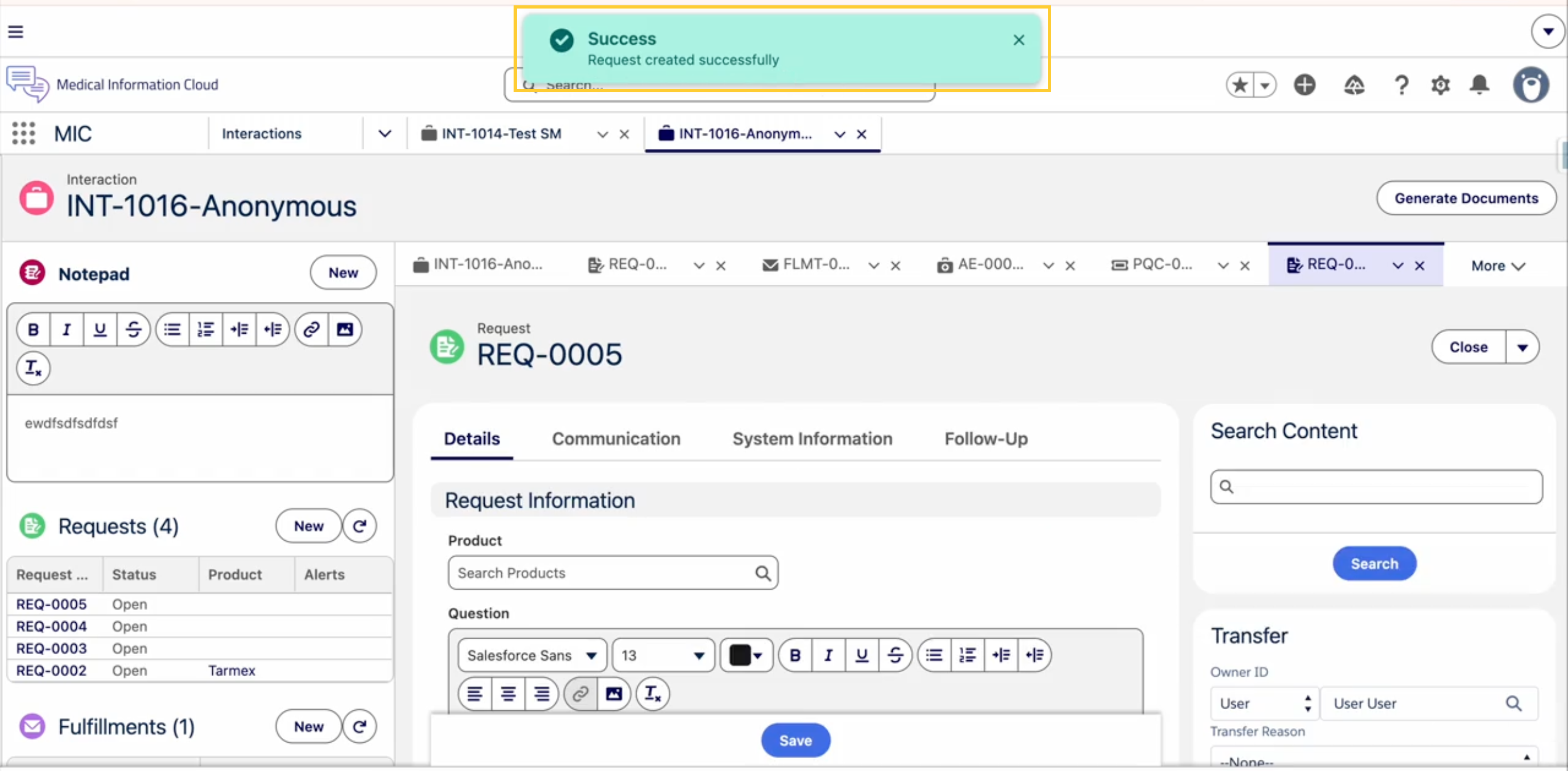
Toast notifications broken after platformShowToast deprecation
When Salesforce disabled the legacy platformShowToast event, it led to broken toast notifications across MIC.
All affected components were updated to use the supported lightning/toast module so that toast notifications display correctly.
Related work item(s): MIC-4332
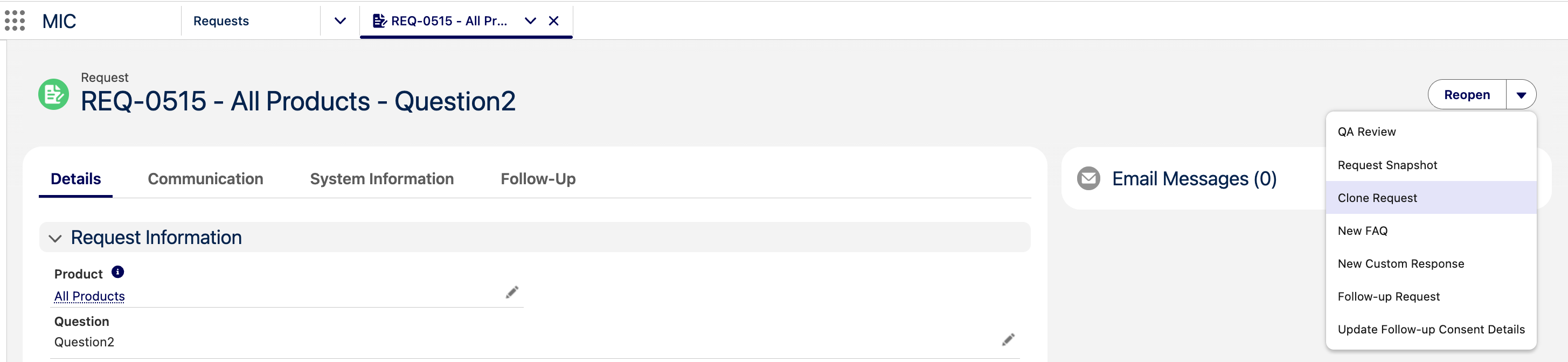
Cloning a closed Request creates record with wrong Record Type
Previously, cloning a closed Request created a new record with Status = Open but the wrong Record Type (MED_Request_Closed), leaving users unable to edit the cloned Request without first reopening it.
Cloned Requests are now created with the correct values — Status = Open and Record Type = MED_Request — and are ready to edit.
Related work item(s): MIC-4330
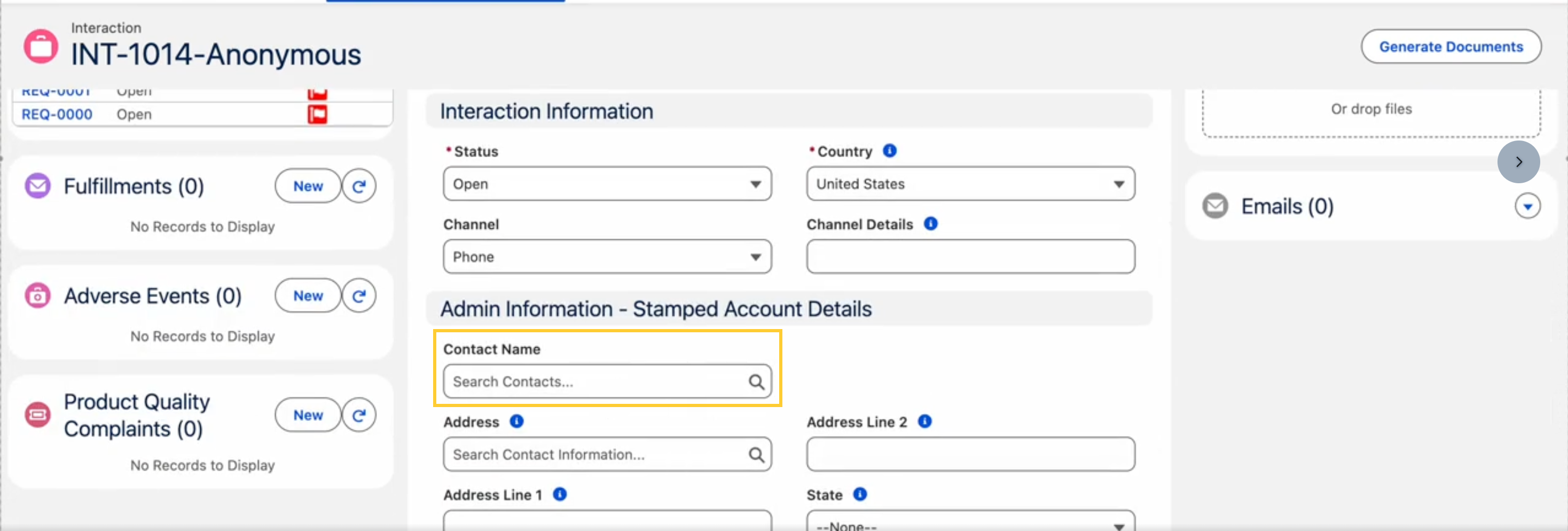
Unable to remove or change the Account on a Case
Previously, Case agents could not remove or change the Account on a Case, making it impossible to correct incorrectly matched Email-to-Case records. When an Account was cleared, the underlying Person Account automatically re-associated through the retained ContactId, so the change failed to persist after saving.
The Case trigger framework now monitors changes to the AccountId field. When a user clears or changes the AccountId on a Person Account, the logic explicitly clears the ContactId to prevent the Person Account from re-associating.
Related work item(s): MIC-4283
Workflow task not showing the correct layout
Previously, Content Management users could not see the Complete Task button needed to mark a workflow task as completed as the Workflow Task Detail Page (CM_Workflow_Task_Detail_Page) did not display the correct fields or available actions.
The Workflow Task Detail Page (CM_Workflow_Task_Detail_Page) flexipage is now activated as the org default and users now see the correct layout (including the right fields and actions) when viewing a workflow task for a document in MCM.
Related work item(s): MIC-4251
Read-Only users unable to access MCM
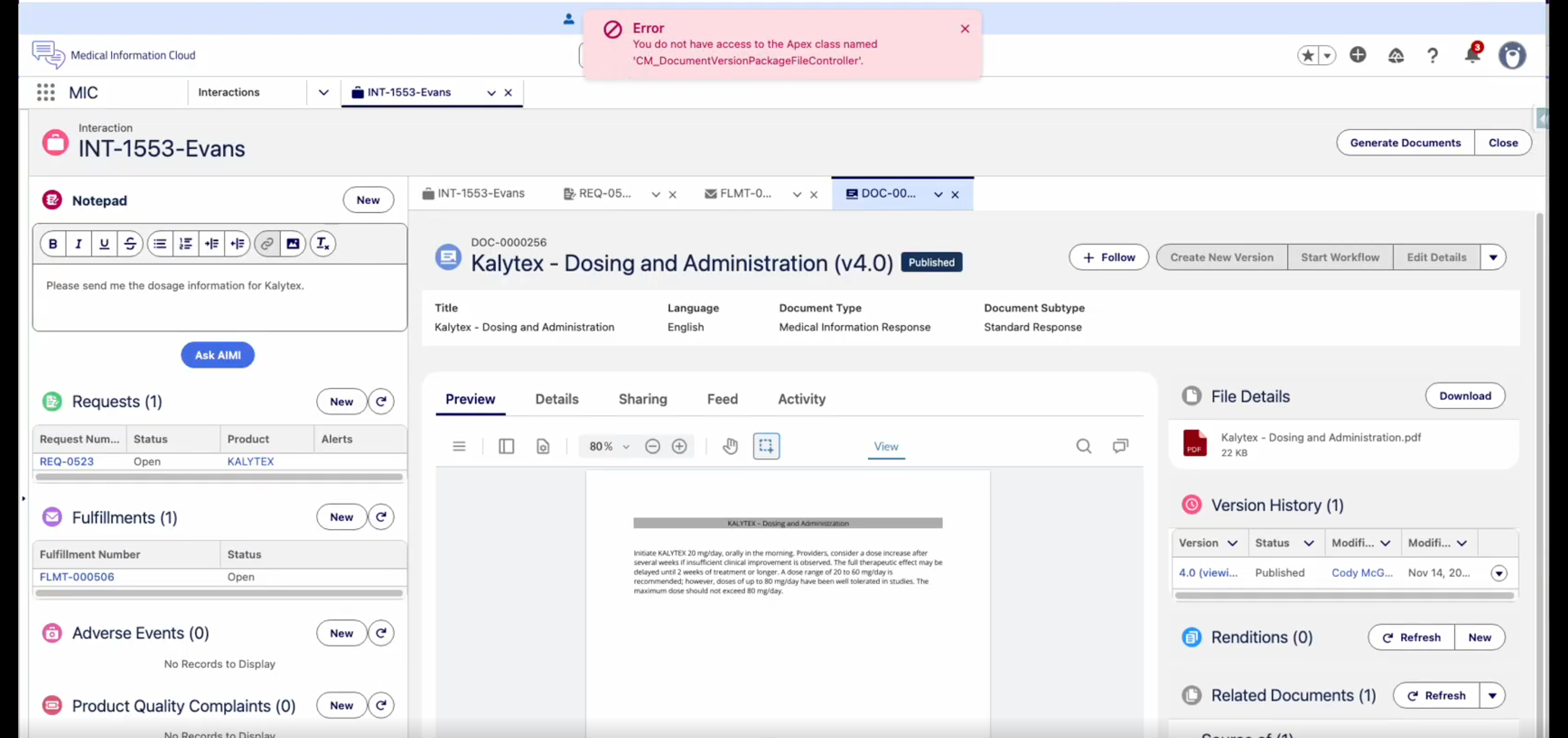
Previously, read-only users could not access MCM, which prevented them from previewing files in the Enhanced Document Viewer due to Apex access error.
The CM_ContentReadOnly permission set now includes the CM_DocumentVersionPackageFileController Apex class so users with Content - Medical User or Content Read Only permission sets can preview attached files in the Enhanced Document Viewer without error.
Metadata changes
The following subsections capture the changes against entities in key areas of Medical Information Cloud that are introduced in this release. This list is scoped to the work items documented above and is not exhaustive of the full Spring '26 release.
Custom labels
Custom label changes are listed in the table below.
New custom labels
| Work item(s) | Custom label(s) |
|---|---|
| MIC-4319 | MED_Digital_Fulfillment_Email_Composer |
| MIC-4066 | MED_Prepare_Fulfillment MED_Finalize_Fulfillment MED_Cover_Letter_Files MED_Case_Documents MED_Files_Merged MED_Merge_Button |
Objects
Object changes are listed below.
New object fields
| Work item(s) | Object | Field(s) |
|---|---|---|
| MIC-4001 | Case | MED_Region__c (Lookup to Region__c) |
| MIC-4191 | MED_Fulfillment__c | MED_Questions__c (Rich Text) MED_Attachments__c (Rich Text) |
| MIC-4238 | MED_Adverse_Event__cMED_AE_Drug_History__cMED_AE_Drug_Information__cMED_AE_Medical_History__cMED_AE_Primary_Source__cMED_AE_Reaction__cMED_AE_Results__c | MED_Run_Presubmit_Validation__c |
Custom metadata types
Custom metadata type changes are listed in the table(s) below:
New custom metadata types
| Work item(s) | Custom metadata type | Metadata record name(s) |
|---|---|---|
| MIC-4191 | mvn__MED_Fulfillment_Child_Summary__mdt | Fulfillment Child Summary |
New custom metadata type fields
| Work item(s) | Custom metadata type | Field(s) |
|---|---|---|
| MIC-3909 | MED_E2B_Setting__mdt | MED_MedDRA_Version__c |
| MIC-3861 | MED_E2B_Setting__mdt | MED_Sender_Fax__c |
| MIC-4066 | mvn__MED_Local_Setting__mdt | MED_Template_Case_DDP_Name__c MED_Template_Final_DDP_Name__c |
Custom metadata records
Custom metadata record changes are listed in the table(s) below:
New custom metadata records are only available via the Medical Information Cloud - Setup plan in the Install Service.
New custom metadata records
| Work item(s) | Custom metadata type(s) | Metadata record name(s) |
|---|---|---|
| MIC-4001 | mvn__TAF_Trigger_Action__mdt | Set_Case_Region |
| MIC-4191 | mvn__MED_Fulfillment_Child_Summary__mdt | Questions |
| MIC-4191 | mvn__MED_Fulfillment_Child_Summary__mdt | Request_Documents |
| MIC-4191 | mvn__TAF_Trigger_Action__mdt | Fulfillment_Content_Doc_Link |
| MIC-4191 | mvn__TAF_Trigger_Action__mdt | Fulfillment_Content_Document |
The Account Search optimization work items (MIC-3144 and MIC-3971) do not
add or modify custom metadata records. Existing Account Search
configuration metadata types, including mvn__MED_Global_Setting__mdt,
mvn__Interface_Handler__mdt, and MED_LY_Layout__mdt, are unchanged in
this release.
Modified custom metadata records
| Work item(s) | Custom metadata type | Metadata record names(s) |
|---|---|---|
| MIC-4066 | mvn__MED_Local_Setting__mdt | Default |
Page layouts
Page layout changes are listed in the table(s) below:
Modified page layouts
| Work item(s) | Object | Page layout | Modification description |
|---|---|---|---|
| MIC-3909 | MED_E2B_Setting__mdt | E2B Setting Layout | Added the MedDRA Version (MED_MedDRA_Version__c) field to the layout. |
| MIC-3861 | MED_E2B_Setting__mdt | E2B Setting Layout | Added the Sender Fax (MED_Sender_Fax__c) field to the layout. |
| MIC-4001 | Case | Case-Lightning Admin | The Region (MED_Region__c) field is added to the layout. |
| MIC-4191 | MED_Fulfillment__c | Lightning Admin Feed Layout, Lightning Closed Feed Layout, Lightning Feed Layout | A Fulfillment Information section is added that contains the Questions (MED_Questions__c) and Attachments (MED_Attachments__c) fields. |
| MIC-4066 | MED_Fulfillment__c | Lightning Admin Feed Layout | The Prepare Fulfillment (MED_Merge_Cover_Letter) and Finalize Fulfillment (MED_Finalize_Merge_Letter) quick actions are added to the Mobile and Lightning action section. |
| MIC-4066 | mvn__MED_Local_Setting__mdt | Local Setting Layout | The Template Case DDP Name (MED_Template_Case_DDP_Name__c) and Template Final DDP Name (MED_Template_Final_DDP_Name__c) fields are added to the layout. |
| MIC-4191 | mvn__MED_Fulfillment_Child_Summary__mdt | Fulfillment Child Summary Layout | The Child Relationship Name (MED_Child_Relationship_Name__c) and Child Query Where Clause (MED_Child_Query_Where_Clause__c) fields are reordered, and the System Information section no longer shows a detail heading. |
Global value sets
Global value set changes are listed in the table(s) below:
Modified global value sets
| Work item(s) | Global value set | Modification description |
|---|---|---|
| MIC-3752 | MED_AE_Dosage_Units | Renamed legacy values (for example, Mg -> mg, µg -> ug, Iu -> [iU]) to the ICH E2B(R3) / UCUM forms. Deactivated the legacy values so that they no longer appear as new selections. Added mg/mL, [drp], and {DF} as new active values. |
| MIC-3752 | MED_AE_Time_Units | Added 10.a (label Decades) as a new active value. |
Validation rules
Validation rule changes are listed in the table(s) below:
New validation rules are only available via the Medical Information Cloud - Setup plan in the Install Service.
New validation rules
| Work item(s) | Custom metadata type | Validation rule | Description |
|---|---|---|---|
| MIC-4568 | mvn__CM_Content_Search_Settings__mdt | CM_Criteria_Required | Blocks save when the Criteria field is blank. |
| MIC-4568 | mvn__CM_Content_Search_Settings__mdt | CM_Data_360_Requires_Full_Config | Blocks save when Search Algorithm is DATA_360 and any of Search Type, Search Index, Data Space, or Min Search Score is blank. |
Apex classes
Apex class changes that are exposed to customer extensions and integrations are listed in the table(s) below:
New global Apex classes
| Work item(s) | Class | Description |
|---|---|---|
| MIC-4568 | mvn.CM_DocumentSearchRequest | Request DTO that bundles every search input — keyword, filters, paging, region codes, and custom attributes — for the published-document and document-version search services. Adds an addCustomAttribute(key, value) helper. |
| MIC-4001 | MED_SetCaseRegion (mvn namespace) | Trigger action handler that sets the Region (MED_Region__c) lookup on an Interaction (Case) based on the selected Country (MED_Country__c) value. |
| MIC-4191 | MED_FulfillmentSummaryOrchestrator (mvn namespace) | Reads active MED_Fulfillment_Child_Summary__mdt records and dispatches each one to its configured formatter to build per-Fulfillment HTML and stamp it onto the configured target field. |
| MIC-4191 | MED_FulfillmentSummaryBridge | Lets non-namespaced code call the namespaced orchestrator via the MED_IFulfillmentSummaryOrchestrator interface. |
| MIC-4191 | MED_IFulfillmentSummaryOrchestrator | Interface used by MED_RequestFulfillmentsCreator to invoke the orchestrator and to stub the orchestrator in tests. |
| MIC-4191 | MED_FulfillmentChildListHtmlBuilder (mvn namespace) | Formatter implementation that renders Fulfillment child records as an HTML bulleted list. |
| MIC-4191 | MED_FulfillmentChildTableHtmlBuilder (mvn namespace) | Formatter implementation that renders Fulfillment child records as an HTML table using a field set for columns. |
| MIC-4191 | MED_FulfillmentFilesListHtmlBuilder (mvn namespace) | Formatter implementation that renders the latest versions of files linked to each Fulfillment as an HTML bulleted list. |
| MIC-4191 | MED_FulfillmentReqDocsListHtmlBldr (mvn namespace) | Formatter implementation that walks Fulfillment to Request Fulfillment to Request Document and renders the resulting document set as an HTML bulleted list. |
| MIC-4191 | MED_FulfillmentChildQuery (mvn namespace) | Service used by the formatters above to query child records with field-set-driven select lists and an optional filter. |
| MIC-4191 | MED_FulfillmentListHtmlRenderer (mvn namespace) | Renderer used by the formatters above to produce the inner <ul> markup. |
| MIC-4191 | MED_FulfillmentChildTableHtmlRenderer (mvn namespace) | Renderer used by the table formatter to produce the inner <table> markup. |
| MIC-4191 | MED_FulfillmentChildHtmlContext (mvn namespace) | Shared schema-resolution helper used by the formatters above. |
Modified global Apex classes
| Work item(s) | Class | Modification description |
|---|---|---|
| MIC-4568 | mvn.CM_PublishedDocumentService | Adds a primary executeSearch(CM_DocumentSearchRequest req) method. The previous 7-argument and 8-argument overloads remain as back-compat shims that build a request and delegate. |
| MIC-4568 | mvn.CM_DocumentVersionSearchService | Adds a primary executeSearch(CM_DocumentSearchRequest req) method. The 14-argument overload remains as a back-compat shim. |
| MIC-4066 | MED_FulfillmentPackageDataProvider (mvn namespace) | New callable actions are exposed: getCaseTemplateDDPNameForCountry, getFinalTemplateDDPNameForCountry, getCoverLetterFilesList, getFulfillmentCaseDocsFilesList, getFinalFilesList, and setFinalDDPFiles. These power the new Prepare Fulfillment and Finalize Fulfillment modals. |
| MIC-4066 | MED_FulfillmentPackageService (mvn namespace) | New methods support the case-documents and final-merge flows: getCoverLetterFilesWithoutCaseDocuments, getFulfillmentCaseDocsFiles, and getFinalFilesList. |
| MIC-4066 | MED_LocalSettings (mvn namespace) | New templateCaseDdpName and templateFinalDdpName accessors expose the new Local Setting (MED_Local_Setting__mdt) fields. |
| MIC-4191 | MED_RequestFulfillmentsCreator (mvn namespace) | After Request Fulfillment records are created or refreshed, the trigger handler now invokes MED_IFulfillmentSummaryOrchestrator.summarizeFulfillmentChildren on the affected Fulfillment records and persists the resulting HTML on the Fulfillment in the same transaction. |
| MIC-4238 | MED_AEChildObjectsUpdate | Propagates the new MED_Run_Presubmit_Validation__c value from a parent Adverse Event to its child records when the value changes on the parent. |
| MIC-4277 | MED_E2BGenerator | Appends the Adverse Event Name to the generated E2B filename so that every generated ICSR file is uniquely named. |
| MIC-3144, MIC-3971 | MED_AccountSearchCtrl (mvn namespace) | New @AuraEnabled(cacheable=true) method getObjectApiNameByRecordId(String recordId) returns the host object's API name so the Quick Search component can resolve the Interaction (Case) lookup at runtime when it is placed on an object other than Interaction (Case). |
Lightning components
Lightning component changes are listed in the table below.
Modified Lightning components
| Work item(s) | Component | Description |
|---|---|---|
| MIC-3144, MIC-3971 | medCaseAccountsQuickSearch (mvn namespace) | The component is no longer restricted to the Interaction (Case) object. A new caseLookupFieldName design property lets administrators specify the host object's lookup field to Interaction (Case), and the component resolves the host object API name automatically via MED_AccountSearchCtrl.getObjectApiNameByRecordId when the standard @api objectApiName value is not available. |
| MIC-3144, MIC-3971 | medNamespaceUtil (mvn namespace) | New CASE__CHILD_LOOKUP_FIELD constant (mvn__MED_Case__c) preserves the previous lookup convention when Case Lookup Field API Name is left blank. |
Permissions
Permission changes are listed in the table(s) below:
New permission sets
| Work item | Permission set | Description |
|---|---|---|
| MIC-4318 | AIMI Option / Ask AIMI (in MIC AIMI Setup) | Grants access to the AIMI Option custom metadata records and to the Apex classes that drive the AIMI prompt-selection actions. Administrators must assign this permission set to users who need to run the Ask AIMI actions. |
Modified permission sets
| Work item | Permission set | Modification description |
|---|---|---|
| MIC-4001 | MED_Medical_Information_Cloud_Admin | Added Read access to Case.MED_Region__c. |
| MIC-4001 | MED_Medical_Information_Cloud_User | Added Read access to Case.MED_Region__c. |
| MIC-4191 | MED_Medical_Information_Cloud_Admin | Added Read and Edit access to MED_Fulfillment__c.MED_Questions__c and MED_Fulfillment__c.MED_Attachments__c. |
| MIC-4191 | MED_Medical_Information_Cloud_User | Added Read and Edit access to MED_Fulfillment__c.MED_Questions__c and MED_Fulfillment__c.MED_Attachments__c. |
| MIC-4066 | Admin profile | Added Read access to mvn__MED_Local_Setting__mdt.MED_Template_Case_DDP_Name__c and mvn__MED_Local_Setting__mdt.MED_Template_Final_DDP_Name__c. |
| MIC-4238 | MED_Medical_Information_Cloud_Admin | Grants read and edit access to the new MED_Run_Presubmit_Validation__c field on Adverse Event and Adverse Event child objects. |
| MIC-4238 | MED_Medical_Information_Cloud_User | Grants read and edit access to the new MED_Run_Presubmit_Validation__c field on Adverse Event and Adverse Event child objects. |
| MIC-4348 | MED_Manage_Reports_and_Dashboards, MED_View_Reports_and_Dashboards, MED_Create_Personal_Reports_and_Dashboards | Added Dashboards and Reports tabs. Corrected the spelling of the MED_Custom_Response permission set label. |
| MIC-4251 | CM_ContentReadOnly | Added CM_DocumentVersionPackageFileController Apex class access so users with Content - Medical User or Content Read Only permission sets can preview attached files in the Enhanced Document Viewer. |
Edit access is intentionally not granted on MED_Medical_Information_Cloud_Admin and MED_Medical_Information_Cloud_User; the trigger action manages the value automatically. The System Administrator profile grants Edit access to the field for users who need to override it manually.
Quick actions
Quick action changes are listed in the table below.
New quick actions
| Work item(s) | Object | Quick action | Description |
|---|---|---|---|
| MIC-4066 | Fulfillment (MED_Fulfillment__c) | Prepare Fulfillment (MED_Merge_Cover_Letter) | Opens a modal to merge cover letter components into one PDF and case documents into a second PDF. |
| MIC-4066 | Fulfillment (MED_Fulfillment__c) | Finalize Fulfillment (MED_Finalize_Merge_Letter) | Opens a modal to combine the cover letter PDF and the case documents PDF into a single final fulfillment package PDF. |
Static resources
Static resource changes are listed in the table below.
Modified static resources
| Work item(s) | Static resource | Modification |
|---|---|---|
| MIC-4066 | MED_PostDeployData | The data-DDP/ddps.csv seed now includes the Global Case Documents Template and Global Final Template DDP records. The title of the Global Cover Letter Template DDP is updated to "Merged Cover Letter for <<Case_CaseNumber>> - <<Now__g>>". The data-DDP/delivery-options.csv seed now includes corresponding Finalize delivery options that point at the new templates. |
Deprecated and deleted items
The following entities are deprecated in the Spring '26 release and will no longer be available or supported in future releases.
Deprecated object fields
| Work item | Object | Field |
|---|---|---|
| MIC-3909 | MED_AE_Drug_History__c | MED_MedDRA_Version_for_Indication__c |
| MIC-3909 | MED_AE_Drug_History__c | MED_MedDRA_Version_for_Reaction__c |
| MIC-3909 | MED_AE_Drug_Information__c | MED_MedDRA_Version_for_Indication__c |
| MIC-3909 | MED_AE_Medical_History__c | MED_MedDRA_Version_for_Medical_History__c |
| MIC-3909 | MED_AE_Results__c | MED_MeDRA_Version_for_Test_Name__c |
-
Each of the deprecated fields above has been renamed with a
(DEPRECATED)prefix on its Label so that administrators can locate them on existing page layouts. The MedDRA version value is now sourced from the new MedDRA Version (MED_MedDRA_Version__c) field on theMED_E2B_Setting__mdtcustom metadata type. See Set the MedDRA version globally for E2B files above. -
The deprecated fields are still readable and writable in this release so that organizations with existing data can complete their migration on their own timeline. The E2B generator continues to honor a populated record-level value when present. Plan to remove these fields from your layouts and migrate any reporting that depends on them before Mavens removes them in a future release.
Required pre-install and pre-upgrade actions
This section includes the required actions administrators must take before installing or upgrading to the Medical Information Cloud Spring '26 release.
Plan Data 360 prerequisites (only if you intend to enable Data 360)
Data 360 dispatch is a new optional capability in this release. If you plan to route any traffic to Data 360 after upgrading, prepare the following before you author Content Search Settings records:
- Confirm the Data Cloud DataKit and Data Lake Object (DLO) ingestion that backs Data 360 search is configured and running. The DataKit is a separate prerequisite to Content Search Configuration.
- Identify the DLO name to use as Search Index. The value must end
with
_index__dlm. - Confirm the Customer Data Platform data space the DLO lives in
(typically
default). - Decide on a minimum search score threshold between
0and1(for example,0.80).
If you do not plan to enable Data 360, no action is required. With no Content Search Settings records authored, V18 behaves the same as previous releases and every search runs on Einstein.
For configuration guidance, see Content Search Configuration.
Confirm DDP templates exist for each country
Before upgrading, administrators must confirm that the
Local Setting (mvn__MED_Local_Setting__mdt) record for each country
references a valid DDP template in the Template Case DDP Name
(MED_Template_Case_DDP_Name__c) and Template Final DDP Name
(MED_Template_Final_DDP_Name__c) fields.
The out-of-the-box Default Local Setting (mvn__MED_Local_Setting__mdt) record points these fields at the new Global Case Documents Template and Global Final Template DDP
records, which are installed by the Medical Information Cloud - Setup plan in the Install Service (customers running the default configuration do not need to take additional action). Customers who maintain custom
Local Setting (mvn__MED_Local_Setting__mdt) records per country must update those records before end users can run the Prepare Fulfillment and Finalize Fulfillment quick actions.
Recommended post-upgrade actions
This section includes the recommended actions administrators should take after upgrading to Medical Information Cloud Spring '26 to enable the new functionality. Each action specifies the criteria for consideration, which details the conditions that must exist to warrant action by a customer.
Set the global MedDRA version on the E2B Setting custom metadata record
If your organization uses MedDRA coding with E2B(R3) submissions and
you want every generated file to use a single MedDRA version, set the
new MedDRA Version (MED_MedDRA_Version__c) field on the E2B
Setting (MED_E2B_Setting__mdt) custom metadata record:
-
In Setup, open Custom Metadata Types and find the E2B Setting (
MED_E2B_Setting__mdt) custom metadata type. -
Click Manage Records and open the active E2B Setting record.
-
Set MedDRA Version to the version your organization uses (for example,
26.0). Use only numbers and the.separator. The field accepts up to four characters per the E2B(R3)4ANrule. -
Save the record.
-
(Optional) Remove the deprecated record-level MedDRA version fields from any page layouts where you previously surfaced them:
MED_AE_Drug_History__c.MED_MedDRA_Version_for_Indication__cMED_AE_Drug_History__c.MED_MedDRA_Version_for_Reaction__cMED_AE_Drug_Information__c.MED_MedDRA_Version_for_Indication__cMED_AE_Medical_History__c.MED_MedDRA_Version_for_Medical_History__cMED_AE_Results__c.MED_MeDRA_Version_for_Test_Name__c
You do not have to clear the record-level values on existing Adverse Event child records. While the E2B generator uses the global MedDRA Version as the default, it still honors a populated record-level value when present. This preserves backward compatibility during migration.
Set the sender telecom values on the E2B Setting custom metadata record
If your organization sends E2B(R3) files to a regulator or partner
safety system that expects sender telephone, fax, or email elements,
set the corresponding fields on the E2B Setting
(MED_E2B_Setting__mdt) custom metadata record:
-
In Setup, open the E2B Setting custom metadata record.
-
Set Sender Telephone (
MED_Sender_Telephone__c) to the sender's telephone number. The generator writes the value as\<telecom value="tel:\<number\>"/\>in elementC.3.4.6. -
Set the new Sender Fax (
MED_Sender_Fax__c) field to the sender's fax number. The generator writes the value as\<telecom value="fax:\<number\>"/\>in elementC.3.4.7. -
Set Sender Email (
MED_Sender_Email_Address__c) to the sender's email address. The generator writes the value as\<telecom value="mailto:\<address\>"/\>in elementC.3.4.8. -
Save the record.
The generator omits the \<telecom\> element entirely when the
corresponding setting value is blank. To explicitly signal a missing
value with an E2B null flavor, set the field to
nullFlavor_\<value\> (for example, nullFlavor_MSK).
Migrate stored Dosage Units and Time Units values (optional)
The Spring '26 picklist updates deactivate the legacy Dosage Units and Time Units labels but do not rewrite existing record values. If your reports or downstream integrations rely on the new labels, you can migrate the stored values:
-
Identify Adverse Event records that reference a legacy value (for example, run a report on
MED_AE_Drug_Information__cfiltered by Dosage Units equal to one of the legacy labels listed in E2B picklist values not E2B(R3)-aligned above). -
Use Data Loader or a Salesforce flow to update each affected record so that Dosage Units or Time Units stores the new label.
-
Once no record references a legacy value, you can remove the inactive entries from the MED_AE_Dosage_Units and MED_AE_Time_Units global value sets if desired. Mavens recommends leaving the inactive entries in place until you have completed any historical reporting that requires the legacy labels.
- Required pre-install and pre-upgrade actions - required actions administrators must take before installing or upgrading to V18.
Optional post-upgrade actions
This section includes the optional actions administrators should take after upgrading to Medical Information Cloud Spring '26 to enable certain functionalities. Each action specifies the criteria for consideration, which details the conditions that must exist to warrant action by a customer.
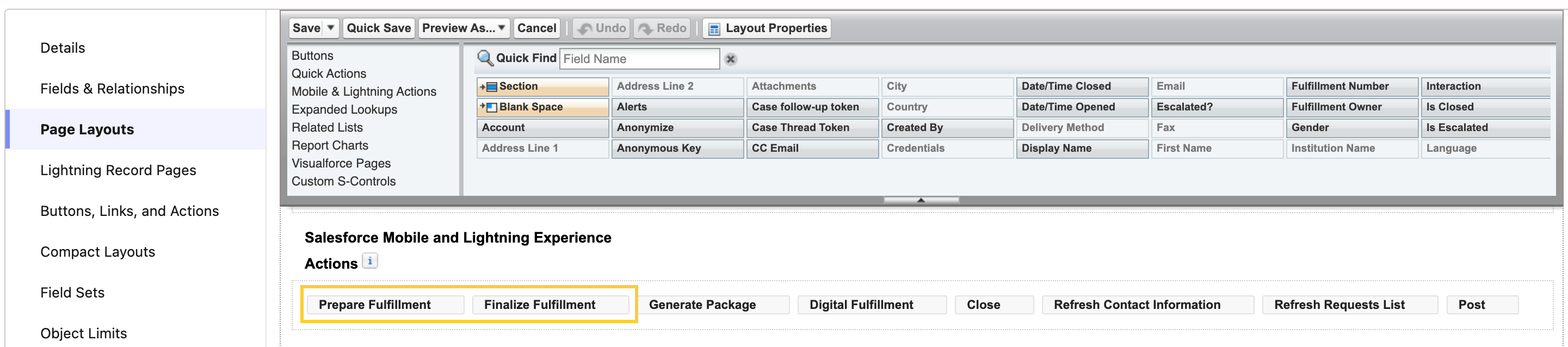
Add Prepare Fulfillment & Finalize Fulfillment quick actions to your Fulfillment page layouts
The V18 upgrade adds the Prepare Fulfillment and Finalize Fulfillment quick actions to the Lightning Admin Feed Layout only. If your users work from the Lightning Feed Layout or Lightning Closed Feed Layout (or a custom Fulfillment layout), the quick actions won't appear on the Fulfillment record page until you add them manually.
To add the quick actions:
-
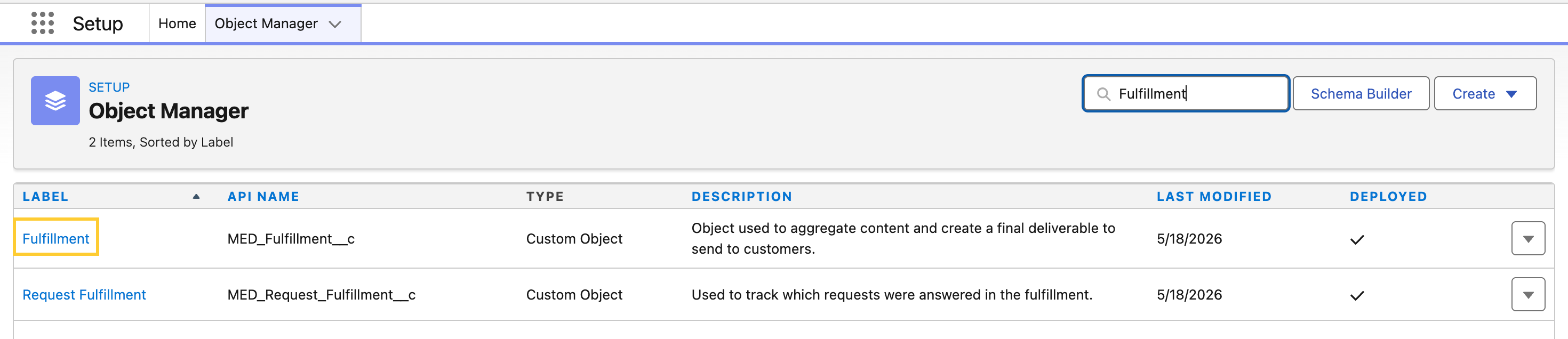
From Setup, open Object Manager and select Fulfillment.
-
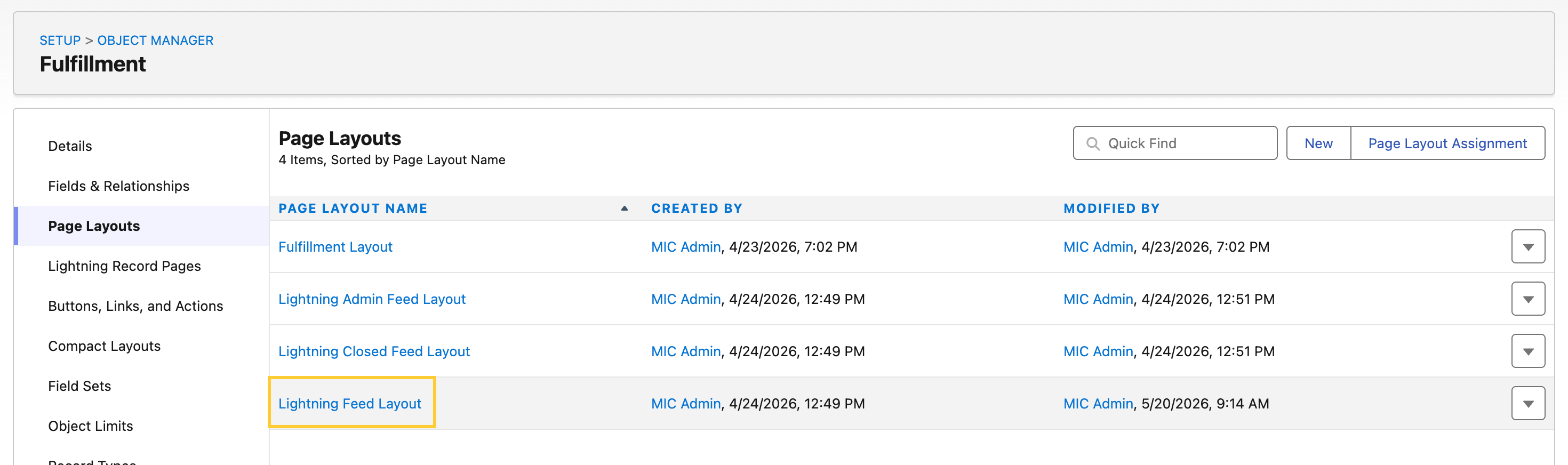
Click Page Layouts and open the layout your users are assigned (for example, Lightning Feed Layout or Lightning Closed Feed Layout).
-
In the Salesforce Mobile and Lightning Experience Actions section, drag Prepare Fulfillment and Finalize Fulfillment into the actions list.
-
Click Save. Repeat for each affected layout.
No action is needed for users assigned the Lightning Admin Feed Layout.